The idea: run the new version next to the old one, and move traffic, not servers
The risky moment of a release is when real users first hit the new code. The classic way, stopping v1 and starting v2 on the same servers, has two problems: there is downtime, and if v2 is broken, going back means another deploy. Blue/green and canary avoid that. They run v1 (the blue fleet) and v2 (the green fleet) side by side, and a router in front decides which fleet gets each request. Releasing means turning a dial from blue to green; rolling back means turning it back.
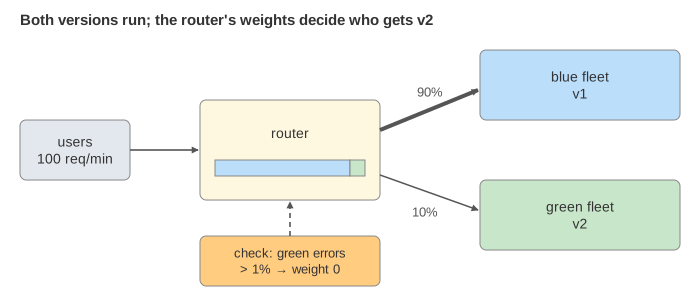
On the canvas, the left panel shows the current minute's 100 requests as a 10 × 10 grid, coloured by the fleet that served them, with a red ✗ for each failure. The middle shows the router: an AWS Application Load Balancer with two weighted target groups, or Route 53 weighted DNS. The right shows the two fleets and their counters, and the timeline below shows each minute's share of traffic. Pick the buggy v2 build to see what each strategy does when v2 fails every 10th request.
Blue/green: switch everything at once, switch back just as fast
In blue/green, the whole green fleet is started next to blue, tested, and then the router sends it 100% of traffic in one move. Before the switch, green is reachable only through a test listener (here port 8443), so a smoke test can run against the real environment without users. After the switch, blue keeps running for a bake time. If an alarm fires (here: more than 1% of green requests fail in a minute), the router switches back. Because blue is still running, that rollback takes effect on the very next request (Demos 3 and 4). AWS CodeDeploy does exactly this for ECS services behind an ALB, with a CloudWatch alarm for automatic rollback.
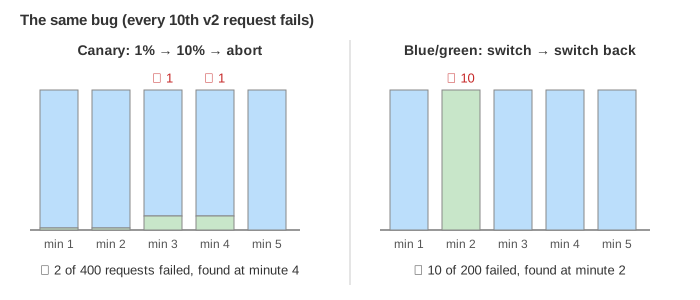
The weakness: when v2 is bad, every user hits it until the alarm fires. In Demo 4 the smoke test passes (5 requests cannot find a 1-in-10 bug), and in the first minute after the switch 10 of 100 requests fail. It also needs two full fleets during the deploy.
Canary: a small share first, then step by step
A canary release sends only a small share of real traffic to v2 and raises it in steps, checking the metrics after each one. The page uses steps like an Argo Rollouts spec:
steps:
- setWeight: 1
- pause: {duration: 2m}
- setWeight: 10
- pause: {duration: 2m}
- setWeight: 50
- pause: {duration: 2m}
# then 100%
After each pause an analysis checks green's error rate over that step (successCondition: result < 0.01).
If it fails, the rollout is aborted: the weight goes back to 0 and the canary is scaled down. With the buggy build
the 10% step sees 20 green requests, 2 of them fail (10%), and the rollout stops at minute 4: only 2 of 400 user requests failed
(Demo 2). A good build reaches 100% at minute 6 (Demo 1). CodeDeploy offers the same idea as
Canary10Percent5Minutes or Linear10PercentEvery1Minute.
Automatic rollback needs enough data
A check is only as good as its sample. At 1% of 100 requests a minute, a 2-minute step sends 2 requests to green: the buggy build passes the first step with 0 failures (Demo 2). Real rollouts therefore use longer first steps, a minimum number of requests before judging, or compare the canary against a baseline of the old version (Kayenta). They also watch latency and business metrics, not only errors.
Shifting with DNS: slow both ways
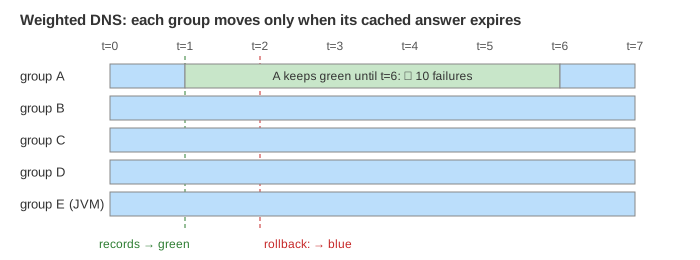
A router can also be DNS: Route 53 weighted records pointing at the blue and the green load balancer (see
How a CDN and Route 53 Work). The weights change at once, but clients only see the change when their
cached answer expires, here after up to 300 s. On the page, groups A to D re-ask one minute apart, so traffic moves 20% per
minute. Group E is a Java service with networkaddress.cache.ttl=-1: it never re-asks, so blue can never be turned
off (Demo 6).
The same delay hits the rollback. In Demo 5 the alarm switches the records back to blue at minute 2, but group A keeps its cached green answer until minute 6 and keeps hitting the bug: 10 failures in all, 8 of them after the rollback was "done". That is why the switch itself is usually done at a load balancer, and DNS is kept for moving between regions or load balancers.
Rolling update: replace the pods one at a time
A rolling update, the default strategy of a Kubernetes Deployment, needs no second fleet and no traffic weights. The Deployment replaces v1 pods with v2 pods a few at a time, and the Service simply spreads requests over the pods that are ready. Two settings bound each step:
strategy:
  type: RollingUpdate
  rollingUpdate:
    maxSurge: 1          # pods allowed above replicas (here 3 + 1 = 4)
    maxUnavailable: 0    # ready pods that may be missing
With maxSurge: 1 a 4th pod (v2) starts first; once its readiness probe passes (here after one
minute) it joins the Service and one v1 pod is stopped. Green's share goes 0 → 33% → 67% and the rollout ends at minute 3.
With maxSurge: 0, maxUnavailable: 1 a v1 pod is stopped before each v2 pod starts: no extra pod is ever
needed, but only 2 of 3 pods serve during the rollout (Demo 8).
A readiness probe only asks "does the pod answer?", not "are its answers right?", so a plain rolling update keeps going with a
buggy build. The page adds the same 1% alarm as the other strategies, which runs kubectl rollout undo. That is just
another rolling update the other way: in Demo 7 the alarm fires at minute 2, but a v2 pod keeps serving until a new v1
pod is ready, so minute 3 fails 3 more requests: 6 of 300 in all.
Two versions at once
During any of these deploys, v1 and v2 serve users at the same time, and both may roll back. So every change they share must work for both: a database column is added first and dropped only in a later release (expand, migrate, contract), an API accepts old and new fields, and a session made by v2 can still be read by v1. A user may also bounce between versions from one request to the next unless the router keeps them on one (sticky sessions or a header).
Side by side
| Blue/green | Canary | Rolling update | |
|---|---|---|---|
| Users exposed to a bad v2 | all, until the alarm | a small share | a growing share |
| Rollback | instant switch back | weight to 0, instant | another rolling update |
| This page, buggy v2 | 10 of 200 failed (Demo 4) | 2 of 400 failed (Demo 2) | 6 of 300 failed (Demo 7) |
| Extra capacity | a full second fleet | a few instances | maxSurge pods, or none (then fewer serve) |
| Time to finish | short | long (steps and pauses) | medium |
| Tools | CodeDeploy, Argo Rollouts blueGreen | Argo Rollouts, Flagger, CodeDeploy | Kubernetes Deployment default |
See also Load Balancer: L4 vs L7 for how the router picks a backend, and Circuit Breaker for protecting callers from a failing service. To find out whether v2 is better for users rather than safe to run, see A/B Testing.
What the page leaves out
- Rolling-update details: percentages for
maxSurge/maxUnavailable,minReadySeconds,progressDeadlineSeconds, liveness probes. - Shadow (mirrored) traffic, A/B tests, header- or cookie-based routing to v2, and feature flags.
- Traffic splitting in a service mesh (Istio, Linkerd), latency and business-metric analysis, comparison against a baseline.
- Multi-region rollouts, one region at a time.
- Real traffic is random; here exactly w% of each minute's 100 requests go to green so every demo gives the same numbers.