The idea: a small fast memory in front of a big slow one
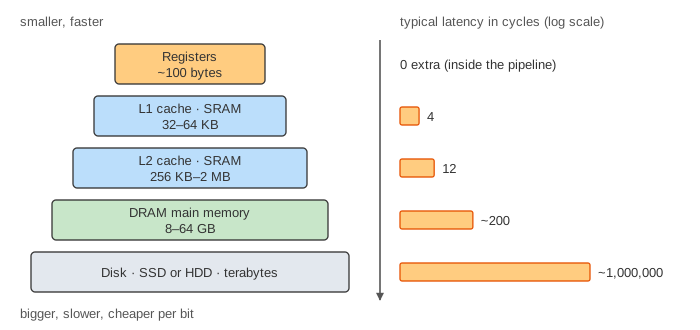
No single memory is both big and fast. SRAM is fast but costs a lot of chip area per bit; DRAM is cheap but about 50 times slower; a disk holds terabytes but takes milliseconds. So a computer stacks them into a memory hierarchy: a tiny fast memory close to the processor, backed by bigger, slower ones. Each level keeps a copy of the data the program used recently. If the program keeps using the same data (and it usually does), almost every access is served by the fast top levels, and the memory looks as big as the disk and almost as fast as the top cache.
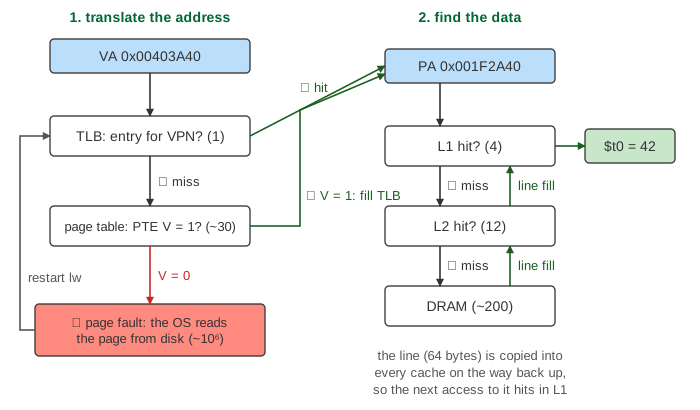
The canvas follows one MIPS instruction, lw $t0, 0($s0), through every level. The column on
the left holds the levels from top to bottom. The blue box is the address as it travels down; the green
boxes are the data coming back up. The counter on the right adds each level's latency, so you can see
where the time goes.
The levels and their latencies
These are typical numbers for a desktop processor at a few GHz, in clock cycles. Real chips differ, but the ratios between levels are what matter.
| Level | Typical size | Typical latency | Managed by |
|---|---|---|---|
| TLB | 64–1,500 entries | 1 cycle | hardware |
| Page table walk | (page table in memory) | ~30 cycles | hardware or OS |
| L1 cache (SRAM) | 32–64 KB | 4 cycles | hardware |
| L2 cache (SRAM) | 256 KB–2 MB | 12 cycles | hardware |
| DRAM main memory | 8–64 GB | ~200 cycles | OS decides which pages |
| Disk (SSD or hard disk) | TB | ~106 cycles | OS (page faults) |
The bars on the canvas use a log scale: every factor of 10 adds the same length. On a linear scale the disk bar would be 250,000 times longer than the L1 bar.
Step 1: translate the address
Programs use virtual addresses. With 4 KB pages, the lower 12 bits are the page offset and the upper 20 bits are the virtual page number (VPN). The VPN must become a physical page number (PPN) before any cache that uses physical addresses can be searched. The TLB (translation lookaside buffer) is a small cache of recent translations, checked in about a cycle. On a TLB miss the hardware (or, on MIPS, a short OS handler) reads the page table entry (PTE) from memory and copies it into the TLB (Demo: TLB miss, page table walk: 1 + 30 + 4 = 35 cycles). The physical address is the PPN followed by the unchanged offset: VPN 0x00403 → PPN 0x001F2 turns 0x00403A40 into 0x001F2A40. More on page tables on Virtual Memory in Hardware and Linux Virtual Memory.
Step 2: find the data
The physical address goes to L1. On an L1 hit the load is done in 4 cycles (Demo: everything hits: 1 + 4 = 5 cycles). On a miss the request goes to L2, and on another miss to DRAM. A miss pays for every level it passed: an L2 hit costs 1 + 4 + 12 = 17 cycles (Demo: L1 miss that hits in L2), a trip to DRAM 1 + 4 + 12 + 200 = 217 cycles (Demo: a miss all the way to DRAM). Real caches look up the TLB and L1 at the same time and start the next level early, but the order of the questions is the same.
Page faults: when the page is on disk
If the PTE's valid bit is 0, the page is not in DRAM at all: a page fault. The processor traps to the operating system. The OS picks a free physical page (a frame), reads the 4 KB page from disk into it, writes the PTE (V = 1 and the PPN), and then restarts the instruction from the start. Reading the disk takes milliseconds, about a million cycles, so the OS runs another program meanwhile (Demo: page fault, page read from disk: 1 + 30 + 1,000,000 + 1 + 4 + 12 + 200 = 1,000,248 cycles). Main memory is in effect a cache for the disk, with pages as its blocks.
Line fills and locality
A cache never fetches just the 4-byte word. It fetches the whole line (64 bytes on the canvas) and keeps a copy at every level the line passes on its way up: a line fill. That pays off because programs have locality. Temporal locality: data used now is likely to be used again soon. Spatial locality: data next to it is likely to be used soon, like the next element of an array. After the first load of 0x00403A40 misses to DRAM (217 cycles), a load of 0x00403A44 in the same line hits in L1 in 5 cycles (Demo: second access to the line hits (locality)). The address 0x00403A80 is in the same page but in the next line: the TLB hits, but the caches miss again.
Average memory access time (AMAT)
Single loads range from 5 cycles to a million. What matters for speed is the average. With hit time t and miss rate MR at each level, the average memory access time is
With typical hit rates of 95 % in L1 and 80 % in L2 (of the loads that missed L1):
So a load costs 6.6 cycles on average, although DRAM costs 200. The miss rates matter a lot: with 90 % in L1 instead of 95 %, AMAT becomes 4 + 0.10 × 52 = 9.2 cycles. Page faults are rare but huge: one per million loads adds 10−6 × 106 = 1 cycle to every load, and one per 10,000 loads would add 100. That is why a machine that runs out of RAM and starts paging (thrashing) slows to a crawl. The TLB adds its own term the same way. How miss rates depend on cache size and associativity is on How a CPU Cache Finds, Misses and Replaces; how SRAM and DRAM cells work is on Memory Arrays. The OS side of reading file pages into memory is on The Page Cache: read vs mmap.
What a DRAM access costs inside the chip, with row hits, row misses and DDR bursts, is shown in DRAM Timing: Why Reading Memory in Order Is Fast.
What the page leaves out
Real processors overlap the levels: the TLB and L1 are read in parallel (a virtually indexed, physically tagged L1), the next level is often started before a miss is certain, and out-of-order cores keep running other instructions during a miss. The page leaves out L3 caches, multi-level page tables and page-walk caches, cache placement and replacement (each item has a fixed slot here), writes, write-back and dirty bits, choosing a victim page and writing it back on a page fault, prefetching, and other cores sharing the caches. The latencies are typical round numbers, not those of one chip.