The idea: a key pair per site instead of a shared password
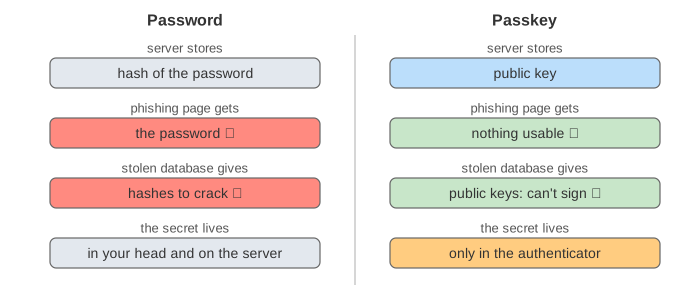
A password is a shared secret: you and the site both know it, so anyone who learns it, from a phishing page, a leaked database or a reused password, can log in as you. A passkey replaces it with a key pair made just for that site. The private key stays in your authenticator (a phone, a laptop's secure chip or a security key); the site stores only the public key. To log in you prove you hold the private key by signing a fresh random challenge. The standard behind it is WebAuthn (in the browser) together with FIDO2/CTAP (between the browser and the authenticator).
The canvas has four regions. On the left Alice's authenticator with one row per site it holds a key for. In the
middle the browser, with the address bar and the clientDataJSON it writes, and under it an
attacker panel with whatever the attacker has captured or stolen. On the right the relying party
(the website, example.com) with Alice's row and its list of challenges. Under them, the bytes the authenticator
signs, and the server's checks in order. The hex values are short stand-ins (8 characters), not real SHA-256 or ECDSA output.
Registration: navigator.credentials.create()
Alice is already signed in (with her password) and clicks "Create a passkey". The server sends options: a random
challenge, rp.id: "example.com", a user.id and the algorithms it accepts
(ES256, ECDSA on P-256, COSE id −7). The browser checks that rp.id is the page's own domain and passes the
request to the authenticator. The authenticator asks Alice to confirm (fingerprint, face or PIN), creates a new key pair for
this rpId only, and returns the credential ID, the public key and authenticatorData. The server stores the
credential ID and the public key in Alice's row (Demo 1).
Signing in: navigator.credentials.get()
The server sends a new challenge. The browser builds clientDataJSON itself:
{ "type": "webauthn.get", "challenge": "…", "origin": "https://example.com" }The authenticator finds the key for the rpId, asks Alice to confirm, increases its signCount (if it keeps one) and
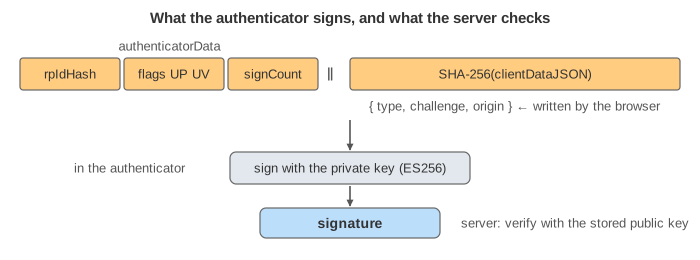
signs authenticatorData ‖ SHA-256(clientDataJSON). authenticatorData holds the
rpIdHash (SHA-256 of example.com), the flags (UP user present, UV user
verified) and the signCount. The server verifies the signature with the public key it stored
(Demo 2).
Why phishing fails
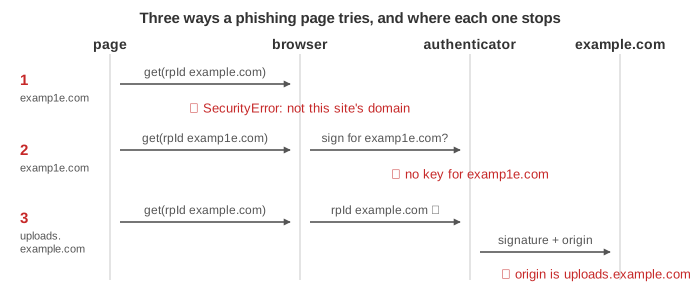
A phishing page on examp1e.com cannot get a usable signature, for three separate reasons:
- The browser refuses an
rpIdthat is not the page's own domain or a parent of it, soexamp1e.comcannot ask forexample.com's passkey (Demo 3, first try). - If it asks for its own rpId, the authenticator has no key for
examp1e.com: a key is never used for another site (Demo 3, second try). - Even where the browser allows the rpId, as on a subdomain the attacker controls, the browser writes the
real origin into
clientDataJSON, and the signature covers it. The server seeshttps://uploads.example.comand rejects it (Demo 4).
Alice doesn't need to notice the wrong address: the check is done by software, not by her eyes. That is the difference from one-time codes, which she can type into the phishing page just as easily as the password.
The server's checks
The server checks the response in this order and rejects it at the first failure. Each attack demo fails at exactly one of them.
| Check | What it stops | Demo |
|---|---|---|
type is webauthn.get | a registration response used as a login | – |
challenge is one the server issued and hasn't used | replaying a recorded login | 5 |
origin is https://example.com | phishing pages, the attacker's subdomain | 4 |
rpIdHash is SHA-256(example.com) | a key made for another site | – |
| UP flag set | a signature with nobody at the device | – |
| UV flag set, if required | a stolen phone or key used without the PIN or fingerprint | 7 |
signCount greater than stored | a cloned hardware key | 8 |
| signature verifies with the stored public key | changed data, forged responses, a stolen database | 6, 9 |
User verification and the signature counter
UP (user present) means someone touched or tapped the authenticator. UV (user verified) means
the authenticator also checked who: a PIN, a fingerprint or a face. A site that wants a passkey to replace both the password and
a second factor asks for userVerification: "required"; then a login with only a touch is refused (Demo 7).
Changing the flag on the way doesn't help: the flags are inside the signed bytes (Demo 6).
A security key keeps its private key in hardware and counts its signatures. If an attacker ever copied the key,
the copy and the original would both report counts, and sooner or later the server sees a count that does not go up: it disables
the credential (Demo 8). Synced passkeys (iCloud Keychain, Google Password Manager, password managers)
are copied between your devices on purpose, so they always report signCount 0 and this check is skipped; their
safety rests on the sync provider's account security.
Passkeys, passwords and one-time codes
| Password | Password + SMS / TOTP code | Passkey | |
|---|---|---|---|
| Phishing page gets | the password | the password and a code it can use at once | nothing usable |
| Recorded login replayed | works | code expired | challenge used |
| Server database stolen | hashes to crack (see Salt vs Pepper) | hashes + TOTP seeds | public keys only (Demo 9) |
| Same secret on many sites | often | often | never: one key pair per site |
See How a Digital Signature Works for signing and verifying step by step, Symmetric vs Asymmetric Encryption for public and private keys, and OWASP A07 Authentication Failures for the attacks on password logins. After a passkey login the site still keeps you signed in with a session (cookies, JWT vs session).
What the page leaves out
- Attestation formats (packed, TPM, Apple) and how a site can require a certified authenticator.
- Signing in on a laptop with a phone by scanning a QR code (the "hybrid" transport), and Bluetooth/NFC/USB details.
- Discoverable credentials and passkey autofill (conditional UI), which let the site skip the username.
- Account recovery when every device is lost, and registering more than one passkey per account.
- The CBOR and COSE encodings, base64url fields, and the real ECDSA arithmetic (the hex values here are short stand-ins).