The idea: a request as an object
In the Command pattern a request, such as "type abc" or "make it bold", becomes an object. The object has two methods: execute() does the work, and undo() takes it back. Once requests are objects, you can keep them in a list, run them later, run them again, or reverse them. Undo and redo in almost every editor are built this way.
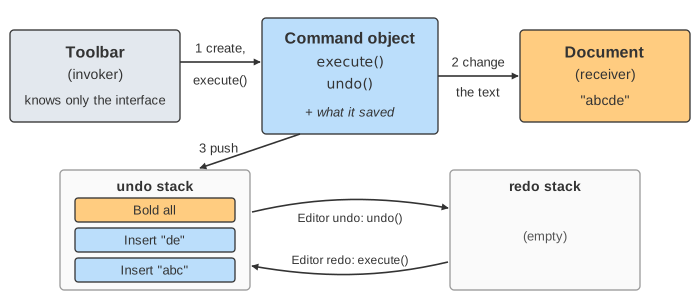
The canvas is a tiny text editor with three roles. The receiver is the document: up to 16 characters, each plain or bold. The invoker is the toolbar: it makes a command for each button, runs it, and keeps the history. The command sits between them. The page's Editor undo and Editor redo buttons are the editor's own; the Step Back button in the playback bar only rewinds the animation.
execute() and undo(): save what you need
A command can only undo what it remembers. So when it executes, it saves just enough to reverse itself. Each command saves something different:
| command | execute() | saves | undo() |
|---|---|---|---|
| Insert "abc" | type "abc" at the end | position and length | delete that many characters there |
| Delete 2 | delete the last 2 characters | the deleted text and its position | insert the text back |
| Bold all | make every character bold | the old bold flags, e.g. --b-- | put the old flags back |
Delete is the one that shows why saving matters: once "bc" is deleted, nothing in the document remembers it. Only the command does. (Demo 4: a new command clears redo runs a Delete; watch its card change to Delete 2 · saved "bc".)
interface Command { void execute(); void undo(); }

class DeleteCommand implements Command {
    Document doc; int count; int pos; String saved;
    void execute() { pos = doc.length() - count; saved = doc.cut(pos, count); }
    void undo()    { doc.insert(pos, saved); }
}
The undo stack and the redo stack
The invoker keeps two stacks. After a command executes, it is pushed on the undo stack. Editor undo pops the top command, calls its undo() and pushes it on the redo stack. Editor redo pops the top of the redo stack, calls execute() again and pushes it back on the undo stack. Both are stacks because undo goes back in time: the last change must be reversed first, or the saved positions would point at the wrong characters. (See the stack page for push and pop on their own.)
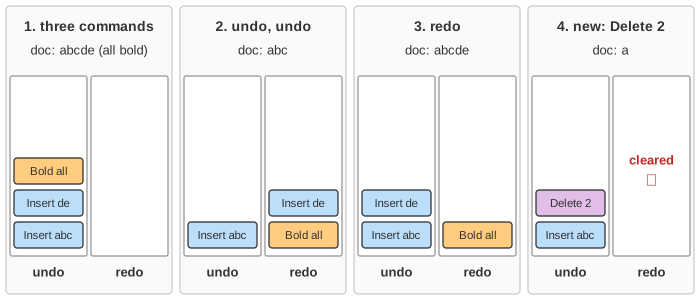
Demo 1: run three commands builds "abcde" in bold, one card per command. Demo 2: undo twice reverses Bold all, then Insert "de"; both cards end up on the redo stack, with Insert "de" on top. Demo 3: undo, then redo runs Insert "de" again.
Why a new command clears redo
A redo command was saved for one exact document. After two undos the document is "abc", and the redo stack holds Insert "de" and Bold all. If you now run Delete 2, the document becomes "a". The redo commands remember position 3 and five bold flags, which no longer fit a one-character document. So every new command clears the redo stack, and the undone work is gone for good. (Demo 4: a new command clears redo.) Some editors keep an undo tree instead, so no branch is lost; the page keeps the usual linear history.
The history also has a limit. On the page it is 6 commands; a 7th drops the oldest, which can then never be undone. Real editors limit history by count or by memory.
Macros: one command made of commands
A macro (a composite command) holds a list of child commands and is itself a command. Its execute() runs the children in order. Its undo() runs the children's undo() in reverse order, for the same reason the history is a stack. The page's macro is Insert "!" then Bold all. One Editor undo first restores the bold flags, then deletes the "!". (Demo 5: macro, undone in one step.) Editors use the same idea to group a burst of typing, or a "replace all", into one undo step.
Where you meet it
Java Swing has UndoableEdit with undo() and redo(), an UndoManager with a limit, and CompoundEdit for macros. Word processors, IDEs, drawing tools and spreadsheets keep a command history the same way. Commands also make queues possible: a request object can be put in a job queue, sent to another thread or machine, logged and replayed. A database log is related but different: write-ahead logging records before and after images so a crash can be redone or undone, much like the state a command saves. See also SOLID: the invoker depends only on the Command interface, so new commands don't change the toolbar.
In Event Sourcing and CQRS commands become stored events, and state is rebuilt by replaying them instead of by undo.
For history that branches and merges, see Git Three-Way Merge.
Git keeps a similar history of moves for its pointers: see Git branches and HEAD, where the reflog lets you undo a reset.
What the page leaves out
A real editor has a caret and a selection, so commands insert and delete in the middle of the text and save the selection too. Typing is usually merged into one command per word or per pause. Some editors use mementos (snapshots of the whole state) instead of per-command undo data, or an undo tree that keeps every branch. Collaborative editors must also transform commands against other users' edits (operational transformation, CRDTs). Commands that touch the outside world, such as sending an email, can't be undone at all and need a compensating action.