The idea: a branch is a file with a hash in it
Git stores your history as commit objects. Each commit has a hash, a snapshot and
the hash of its parent. Commits never change. What changes is a handful of
refs: small text files that hold a commit hash. A branch is one of
them, .git/refs/heads/main, and its whole content is one hash. HEAD is
another file, .git/HEAD, that says which branch you are on.
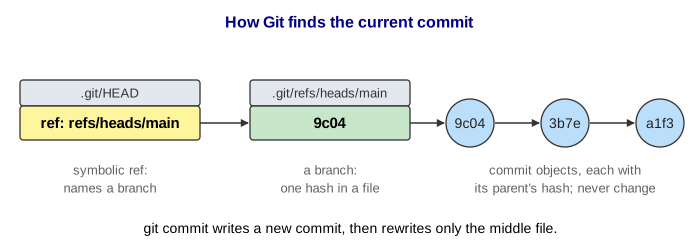
The page draws real hashes cut to 4 hex digits (Git uses 40, and accepts any unique prefix of 4 or more). On the canvas, green boxes are branches, the yellow box is HEAD, and arrows point from a commit to its parent.
HEAD: the pointer to the pointer
Normally .git/HEAD does not hold a hash. It holds ref: refs/heads/main: a
symbolic ref that names a branch. To find the current commit Git reads HEAD, then reads
the branch file it names. You can check it yourself with cat .git/HEAD and
git rev-parse HEAD.
What git commit does to the refs
- Write a new commit object whose parent is the commit HEAD resolves to.
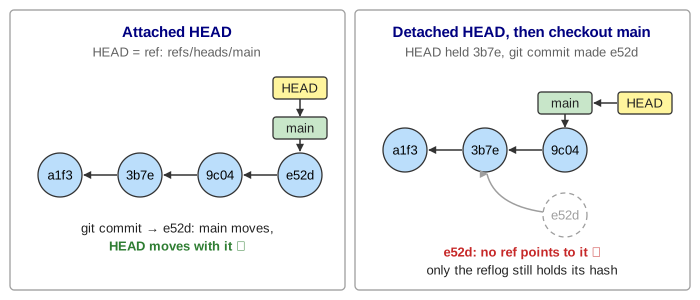
- Write the new hash into the branch file HEAD names. The branch moves forward; HEAD, which only names the branch, moves with it.
- Append a line to the reflog, because HEAD now resolves to a new commit.
No other branch moves. (Demo: commit moves the branch, HEAD follows)
Branches are cheap; checkout moves HEAD
git branch feature writes one file, .git/refs/heads/feature, with the
current hash in it. Nothing is copied, which is why branching in Git is instant. HEAD does not move,
so you are still on main. git checkout feature (or git switch
feature) rewrites .git/HEAD to ref: refs/heads/feature and updates the
working tree. From then on, commits move feature and leave main where it
was, so the history forks. (Demo: branch + checkout: two pointers, one moves)
Detached HEAD
git checkout HEAD~1, or checking out any hash or tag, writes a bare hash into
.git/HEAD. That is a detached HEAD: HEAD points at a commit, not at a
branch. You can look around and even commit; each new commit moves only HEAD. When you check out a
branch again, nothing points at those commits any more. Git warns
"you are leaving 1 commit behind, not connected to any of your branches", and the page draws
such commits faded. (Demo: detached HEAD, then the commit is left behind)
The reflog: undo for pointers
Every time HEAD changes, Git appends a line to .git/logs/HEAD: old hash, new hash,
who, when and why. git reflog prints it newest first, and HEAD@{n} names
where HEAD was n moves ago. Each branch has its own reflog too
(main@{1}, in .git/logs/refs/heads/main).
So a "lost" commit is not lost yet. After git reset --hard HEAD~1,
git reset --hard HEAD@{1} puts the branch back (Demo: reset --hard loses a commit, the
reflog undoes it). After a detached HEAD, find the hash in git reflog and give it a
branch: git branch rescue e52d (Demo: rescue a lost commit with git branch).
The reflog is local and temporary: git gc drops entries after
gc.reflogExpire (90 days) or, for commits no branch reaches,
gc.reflogExpireUnreachable (30 days), and then prunes the commits.
| Command | File it writes | Reflog line for HEAD? |
|---|---|---|
git commit | a new commit, then the branch file (or HEAD when detached) | yes: commit: … |
git branch feature | refs/heads/feature | no, HEAD did not move |
git checkout feature | HEAD = ref: refs/heads/feature | yes: checkout: moving from … |
git checkout HEAD~1 | HEAD = a hash (detached) | yes |
git reset --hard X | the branch file HEAD names | yes: reset: moving to X |
The objects themselves (commits, trees, blobs) are the subject of the Git objects page in this series; how branches come back together is covered by the merge vs rebase and three-way merge pages. For another undo history built from recorded steps, see the Command pattern: undo and redo.
What the page leaves out
- The working tree and the index: checkout and
reset --hardalso rewrite files, which the page only mentions. - Merge commits with two parents, tags (
refs/tags), remote-tracking branches (refs/remotes/origin/main) andORIG_HEAD. packed-refs: aftergit gcmany refs move into one file, and a loose file wins over the packed line.- Full 40-digit SHA-1 (or SHA-256) hashes, timestamps and authors in the reflog lines, and branch reflogs next to the HEAD reflog.
git switchandgit restore, the newer split of checkout's two jobs.