The idea: a store where the key is the hash of the content
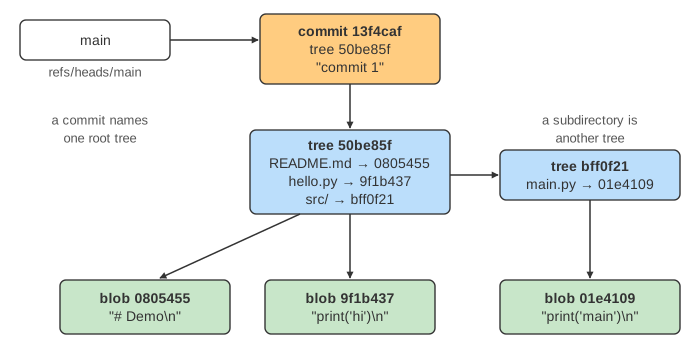
Under the commands, Git is a simple key-value store. You give it some bytes; it computes their SHA-1 hash and saves the bytes under that hash. The hash is the object's name, its object ID. This is called content addressing: the name comes from the content, so the same content always gets the same name. Everything Git keeps about your project is one of three kinds of object: a blob (the content of a file), a tree (a directory listing) and a commit (a snapshot with its history).
On the canvas, the left panel is your repository as you see it: the files in the working tree, the index (.git/index, also called the staging area) and the list of files in .git/objects. The right panel draws the same objects as a graph, commits on top, trees in the middle and blobs at the bottom, with a box below that shows the exact bytes being hashed. Pick a change in the change a file… menu, then press git add and git commit, or run a demo. The hashes are real: the same commands in a real repository, with the same author and dates, print the same IDs.
How an object ID is computed
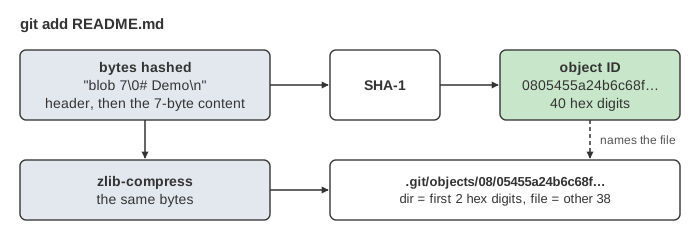
Git puts a short header in front of the content, <type> <size in bytes>\0, and hashes the whole thing. The file README.md with the 7 bytes # Demo\n becomes:
$ printf '# Demo\n' | git hash-object --stdin
0805455a24b6c68fbc38d0fa5d121f735984285d

SHA-1("blob 7\0# Demo\n") = 0805455a24b6c68fbc38d0fa5d121f735984285d
Git compresses those same bytes with zlib and writes them to a file named after the hash: the first two hex digits are a directory, the other 38 are the file name, so this blob lives in .git/objects/08/05455a24b6…. The two-digit directories keep any one directory from holding too many files. git cat-file -p 0805455 reads an object back, and git cat-file -t prints its type.
What git add writes
git add does two things for each changed file. It writes a blob holding the file's content, and it records mode hash path in the index (git ls-files -s shows it). The blob does not contain the file name or its permissions; those live in the index and later in a tree. Nothing else is written: no tree, no commit (Demo 1: first git add and git commit).
If you add a file, edit it and add it again before committing, the first blob stays in .git/objects with nothing pointing to it. It is unreferenced (or dangling), drawn grey on the canvas. git fsck --unreachable lists such objects, and git gc deletes them after a grace period, two weeks by default (Demo 5: add, edit, add again).
What git commit writes
git commit reads the index and writes, from the bottom up:
- a tree for every directory: one entry per file or subdirectory, sorted by name, each
mode name\0followed by the 20 raw bytes of the entry's hash (100644is a normal file,100755an executable,040000a subdirectory, which points to another tree); - a commit: the root tree's hash, the parent commit's hash (none for the first commit, two for a merge), the author and committer with a timestamp, a blank line and the message;
- then it moves the current branch, here
refs/heads/main, to the new commit's hash.
$ git cat-file -p HEAD
tree bedabea16b85697c69bd9452ce4f40502cc431b1
parent 8a22433c0ac845ab26191ae4d534f33214d6c7c1
author Ann <ann@example.com> 1700000060 +0000
committer Ann <ann@example.com> 1700000060 +0000

commit 2
Branches and HEAD are files outside .git/objects that hold a commit hash; the page GitRefsHead, next in this Git series, follows them.
Same content, same object
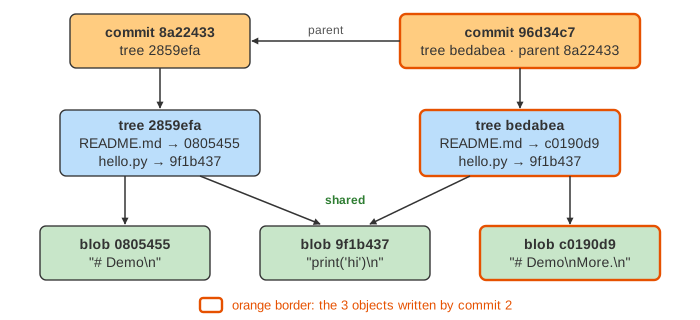
A commit is a full snapshot, not a list of changes, yet a new commit is cheap: anything that did not change already exists under the same hash, so the new tree simply points to it.
| you do | new blobs | new trees | new commits | demo |
|---|---|---|---|---|
| edit one file, commit | 1 | 1 | 1 | Demo 2 |
| copy a file under a new name, commit | 0 | 1 | 1 | Demo 3 |
| undo an edit, commit | 0 | 0 | 1 | Demo 4 |
In Demo 3 the tree has two names, README.md and notes.md, pointing to the one blob 0805455. In Demo 4 the third commit's tree has the same entries as the first commit's tree, so it has the same hash, 2859efa, and only a new commit is written. Renames work the same way: the blob is unchanged, only the tree differs.
Change one byte, change every hash above it
A tree contains the hashes of its blobs, and a commit contains the hash of its tree and of its parent. Change one byte in a file and its blob gets a new hash, so the tree listing it changes, so the commit changes, and so does every later commit. A commit hash therefore pins the whole snapshot and all of its history: this is a Merkle structure, the idea behind Merkle trees. If a byte on disk is damaged, the content no longer matches its name and git fsck finds it. Signed tags and commits sign only a hash, yet cover everything below it (see digital signatures, and encryption vs hashing for what a hash function guarantees).
SHA-1 is no longer considered collision-resistant: in 2017 the SHAttered attack produced two different PDFs with the same SHA-1. Git now uses a hardened SHA-1 that detects such attacks, and supports SHA-256 repositories (git init --object-format=sha256), where IDs have 64 hex digits.
How these objects are stored on disk, loose and packed with deltas: Git Packfiles.
What the page leaves out
Subdirectories on the canvas (the figures show a nested tree), executable and symlink modes, annotated tag objects (the fourth object type), merge commits with two parents, and git commit -a. Real Git stores many objects packed and delta-compressed in .git/objects/pack, covered by the GitPackfiles page of this series; merging is in MergeVsRebase and ThreeWayMerge. The index is really a binary file that also caches file sizes and timestamps, so git status does not have to rehash every file.