The idea: open once, lend many times
A web request usually needs the database for a few milliseconds. Opening a new database connection takes longer than that: a TCP handshake, a login, and in PostgreSQL a whole new operating-system process. A connection pool opens a few connections once and keeps them. Each request borrows one, runs its queries and returns it, and the next request reuses it.
The page shows a Java application with six request threads (T1–T6, like Tomcat worker threads) and a PostgreSQL server. Every message between them flies in its own row. One tick of the clock is 1 ms and the network takes 1 ms each way. Pick HikariCP pool or no pool, then press Request, Burst ×6 or Leak, or run a demo.
What opening a connection costs
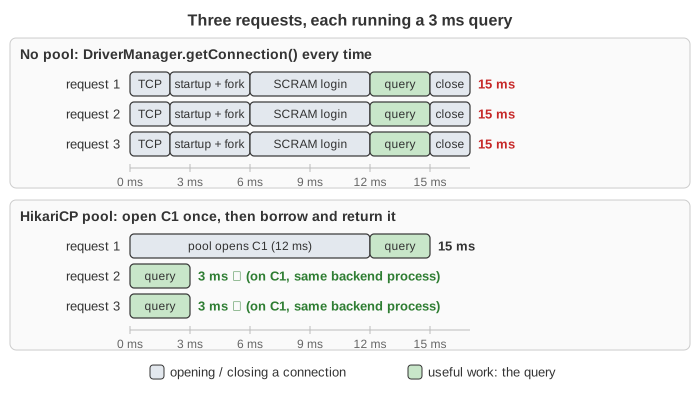
Without a pool, DriverManager.getConnection() does all of this for every request (Demo: no pool, open and close every time):
| Step | Messages | Time here |
|---|---|---|
| TCP handshake | SYN, SYN-ACK, ACK | 2 ms |
| Startup | StartupMessage user=app database=shop; the postmaster forks a backend process | 1 + 3 ms |
| SCRAM-SHA-256 login | AuthenticationSASL, SASLInitialResponse, SASLContinue, SASLResponse, then AuthenticationOk … ReadyForQuery | 6 ms |
| Total to open | 12 ms | |
| The query itself | Query → RowDescription, DataRow, CommandComplete, ReadyForQuery | 3 ms |
| Close | Terminate; the backend process exits; TCP FIN | 2 ms |
So a 3 ms query costs 15 ms, and the database forks and kills a process for each request. With TLS (sslmode=require) add one or two more round trips. Over a real network to another data centre each round trip can be tens of milliseconds, which makes the difference far bigger.
Borrow and return
With a pool, dataSource.getConnection() takes an idle connection and returns at once: no network, no new process. connection.close() does not close the socket. It gives the connection back to the pool as idle, and the backend process on the server stays alive for the next borrower. In Demo: pool, open once then reuse the first request takes 15 ms (the pool has to open C1) and the next two take 3 ms each, all on C1 and the same PostgreSQL process.
try (Connection c = dataSource.getConnection();          // borrow
     PreparedStatement ps = c.prepareStatement("SELECT * FROM orders WHERE id = ?")) {
    ps.setLong(1, id);
    ...
}                                                        // close() = return to the pool
A pool is a counting semaphore with maximumPoolSize permits, plus a list of open connections.
When the pool is empty: waiting and connectionTimeout
If no connection is idle and the pool is below maximumPoolSize, HikariCP opens a new one in the background. If the pool is already full, the thread blocks in getConnection(). A returned connection goes straight to the first waiting thread. In Demo: 6 requests, pool of 3 the pool opens only 3 connections; T1–T3 finish after 15 ms and T4–T6 after 18 ms. PostgreSQL never sees more than 3 connections.
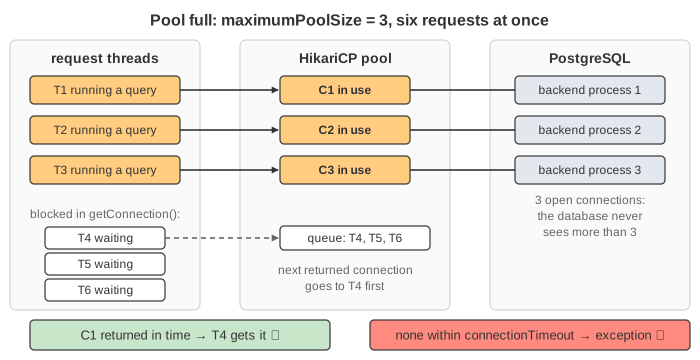
A thread waits at most connectionTimeout (30 s by default, 50 ms here). Then getConnection() throws SQLTransientConnectionException: Connection is not available, request timed out. In Demo: slow queries, waiters time out each query holds its connection for 60 ms, so T4–T6 give up at 50 ms while the database itself is far from busy. The fix is usually faster queries or shorter transactions, not a bigger pool.
Connection leaks
A thread that never calls close() (an exception jumped over it, no try-with-resources) keeps its connection forever. The pool cannot take it back. In Demo: a connection leak drains the pool three leaks fill the pool of 3, and the next request times out after 50 ms, although PostgreSQL shows three idle processes. leakDetectionThreshold makes HikariCP log a warning with the stack trace of the code that borrowed the connection, once it has been out longer than the threshold. It only reports the leak; it does not fix it.
How big should the pool be?
PostgreSQL has its own limit, max_connections (100 by default, 5 here). Without a pool, a burst of requests opens a connection each and the extra ones fail with FATAL: sorry, too many clients already (SQLSTATE 53300; Demo: no pool, 6 at once). With pools, the sum over all application instances counts: 10 instances × a pool of 20 = 200 connections.
More connections do not mean more work done. The database has a fixed number of CPU cores and disks; past that, extra connections only add context switches and lock contention. HikariCP's guide suggests starting near connections = (cores × 2) + effective_spindle_count and measuring. A thread waiting a millisecond for a connection is cheaper than a query slowed down by a crowded server. Little's Law gives the other side: connections needed ≈ queries per second × seconds each query holds a connection (see Latency vs Throughput). Connection Pool Sizing runs pools of 2, 8 and 32 connections side by side against the same database.
Retiring connections
The pool also closes connections on purpose:
idleTimeout(10 min by default, 200 ms here): a connection idle that long is closed, but the pool keeps at leastminimumIdle. Demo: idle connections are closed closes all three (minimumIdle is 0 here).maxLifetime(30 min by default, 500 ms here): every connection is replaced after this age, before a firewall, load balancer or the database drops it silently. A connection in use is closed when it is returned.keepaliveTimepings idle connections so that idle sockets are not cut by the network.
HikariCP's housekeeper checks this every 30 seconds; on this page the checks run at the exact moment, or when a connection is borrowed or returned.
HikariCP parameters on this page
| Parameter | Meaning | Default | Here |
|---|---|---|---|
maximumPoolSize | most connections, idle + in use | 10 | 2 / 3 / 5 |
minimumIdle | idle connections the pool tries to keep | = maximumPoolSize | 0 |
connectionTimeout | longest wait in getConnection() | 30 000 ms | 50 ms |
idleTimeout | close a connection idle this long | 600 000 ms | 200 ms |
maxLifetime | replace every connection after this age | 1 800 000 ms | 500 ms |
leakDetectionThreshold | warn when a connection is out this long | 0 (off) | 60 ms |
The counters under the pool are the ones HikariCP exposes through its MXBean and Micrometer metrics: ActiveConnections, IdleConnections, TotalConnections and ThreadsAwaitingConnection.
A common production configuration
The page uses tiny timeouts so things happen in milliseconds. A typical Spring Boot service on PostgreSQL starts from something like this and then tunes it with the metrics above: Connection Pool Settings in Action plays the incident behind each of these values.
spring:
  datasource:
    url: jdbc:postgresql://db:5432/shop
    hikari:
      pool-name: shop-pool
      maximum-pool-size: 10           # small: bigger is rarely faster
      minimum-idle: 10                # = maximum: a fixed-size pool
      connection-timeout: 3000        # 3 s: fail fast instead of the 30 s default
      max-lifetime: 1500000           # 25 min: below every DB / proxy / firewall limit
      keepalive-time: 120000          # ping idle ones so firewalls keep them
      leak-detection-threshold: 20000 # warn when a connection is held over 20 s
      data-source-properties:
        socketTimeout: 30             # seconds; no thread hangs forever
| Setting | Common value | Why |
|---|---|---|
maximumPoolSize | 10–20 | Start near cores × 2 of the database and raise it only if ThreadsAwaitingConnection stays high while the database still has CPU to spare (sizing). |
minimumIdle | = maximumPoolSize | HikariCP recommends a fixed-size pool: a burst never waits for new connections to open. Set it lower only to save idle connections on a shared database; then idleTimeout matters. |
connectionTimeout | 1–5 s | Shorter than the HTTP request timeout, so a starved pool returns a clear error instead of piling up threads. |
maxLifetime | a few minutes under the shortest limit | Load balancers, cloud database proxies, firewalls and MySQL’s wait_timeout can close a connection the pool still holds; the pool should retire it first. The default 30 min is fine when there is no such limit. |
keepaliveTime | 1–5 min | Must be shorter than maxLifetime and than any idle cut-off on the network path. |
leakDetectionThreshold | longer than your slowest legitimate transaction | Logs the stack trace of a borrower that kept a connection too long (leaks). Too short gives false alarms. |
driver socketTimeout | above the longest query | Without it a query on a dead network connection can block a thread and its pooled connection forever. |
Two limits have to fit together across the whole system:
- Connections: app instances ×
maximumPoolSize(+ migrations, admin tools, other services) must stay below PostgreSQL'smax_connectionsminussuperuser_reserved_connections. 6 instances × 10 = 60 fits in the default 100; autoscaling to 12 instances does not. That is the point where a PgBouncer in front of the database helps. - Time: keep the database's
statement_timeoutandidle_in_transaction_session_timeoutset as well, so one slow query or a forgotten transaction cannot hold a pooled connection for minutes.
Fewer queries per request also means each borrow is shorter: an ORM loop with N+1 queries keeps a connection N times longer than one join would.
A pool in the app vs PgBouncer
A pool can also sit outside the application, in front of the database. PgBouncer accepts many client connections and shares a few real server connections among them.
| Pool in the app (HikariCP) | PgBouncer | |
|---|---|---|
| Where | inside each application process | a separate process near the database |
| Server connections shared by | the threads of one process | all clients of all applications |
| When a server connection is given back | at close() | at the end of the session, transaction or statement (pool_mode) |
| Good for | a few long-running app servers | many app instances, serverless functions |
Many systems use both. In transaction mode, session state (SET, advisory locks, some prepared statements) does not survive between transactions.
Why PostgreSQL in particular needs a pooler (a process per connection, a hard max_connections) is animated in PostgreSQL Process Architecture.
What the page leaves out
- TLS, and real timings: a fork and a SCRAM login cost more than shown, and networks are slower than 1 ms.
- Checking a connection before lending it (HikariCP skips the check if it was used in the last 500 ms) and what happens after a database restart.
- Connection state that leaks to the next borrower: open transactions,
autoCommit, session settings. HikariCP resets the standard ones on return. - Prepared-statement caches per connection, several application instances, read replicas, and asynchronous drivers (R2DBC).
- The order in which HikariCP really hands out connections: it prefers the one this thread used last, and a new connection may go to any waiter.
See also How PostgreSQL Runs a Query for what the backend process does with the query, and TCP Socket for the handshake. The N+1 Query Problem shows how an ORM loop can hold a connection for many small queries.