The idea: a connection is only useful while its backend can work
A connection pool decides how many transactions may be inside the database at the same time. It is tempting to make it big, so that no request ever waits for a connection. But a connection does not make the database faster. Each one is a backend process that needs a CPU core or the disk to make progress. Once every core is busy, another connection only adds another process competing for the same cores.
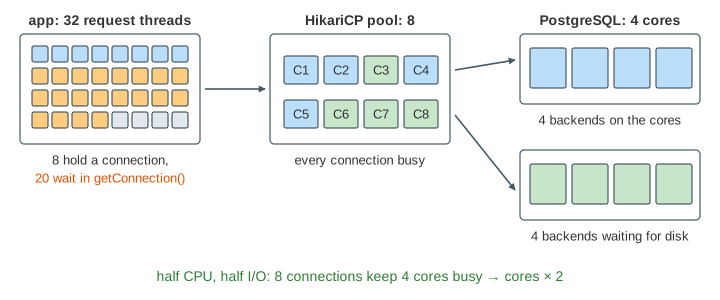
The canvas runs the same load three times on one clock (1 step of the model = 1 ms): 32 request threads, each doing 3 ms of app work and then one transaction, against a 4-core database, through pools of 2, 8 and 32 connections. Each lane shows the threads (orange: waiting in getConnection(), blue: holding a connection, grey: app work), the pool's connections (blue: the backend wants CPU, green: it waits for the disk), the 4 cores with this millisecond's CPU split into work, time lost to switching (red) and idle time, and the measured throughput and latency.
Too small: idle cores, a long queue
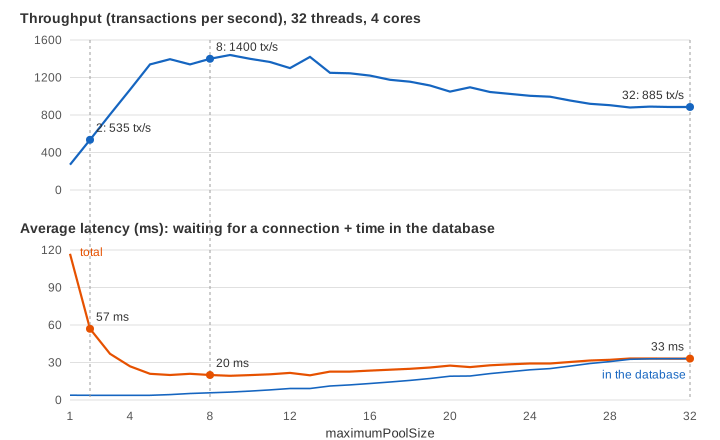
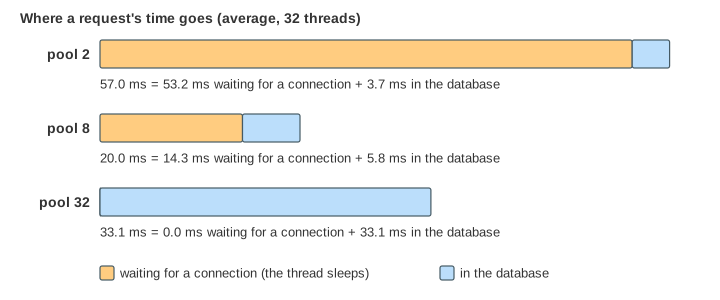
A transaction here needs on average 2 ms of CPU and 2 ms of disk I/O; with the model's 1 ms steps it holds its connection for 3.75 ms on average. A pool of 2 can therefore finish at most 2 / 3.75 ms ≈ 535 transactions per second, however many cores the database has. In Demo 2 two threads get in and 28 queue; at least two cores are always idle, and all four while both transactions wait for the disk. After 300 ms (Demo 3) a request takes 57 ms on average: 53 ms of waiting for a connection, under 4 ms of actual work.
Too big: time-slicing and contention
A pool of 32 lets every thread in at once. Most of the 32 backends are runnable at the same time, and 4 cores cannot run 31 processes, so the operating system time-slices them: each gets a few percent of a core. Time-slicing alone would only make each transaction slower, not the database. But switching is not free:
- Context switches: the kernel saves and restores registers and switches address spaces (PostgreSQL runs one process per connection); see Linux Context Switch.
- Cold CPU caches: a process that comes back to a core finds its data evicted from L1/L2 by the 30 others.
- Lock and latch contention: more transactions at once fight over the same buffer pages, index pages, WAL insertion and row locks, and spin or sleep waiting for each other.
- Memory: every backend has its own memory, and each sort or hash can take
work_mem; 32 backends sorting at once can push the server into swapping.
The page folds all of this into one number: every runnable backend beyond the cores costs 5 % of the CPU's work (k = 0.05). With 31 runnable backends that is more than half of the CPU (red in the bar). Pool 32 ends at 885 transactions per second and 33 ms per request, all of it inside the database. Demo 5 sets the cost to zero: then the big pool is the fastest (1 865 tx/s). The slowdown comes entirely from that overhead, and real databases have it.
Just right: cores × 2
With 8 connections, about half of the busy backends are on a core and half are waiting for the disk, so the cores rarely sit idle and rarely have more than a few backends to switch between. Pool 8 gets 1 400 transactions per second through, 2.6 times pool 2 and 1.6 times pool 32. HikariCP's wiki gives the same starting point:
connections = (core_count × 2) + effective_spindle_countThe "× 2" assumes that a transaction waits for I/O about as long as it computes. effective_spindle_count is the number of disk requests the storage can serve at once (the number of spinning disks; with data cached in memory it is 0). It is a starting point, not a law: transactions that wait a lot on something else (locks held by others, a slow network to remote storage, calls out of the database) can use more connections, purely CPU-bound ones fewer. Demo 7 compares 4, 8 and 16: 1 070, 1 400 and 1 220 tx/s. The top of the curve is flat, so being a little off does not matter; being 4 times too big does.
Waiting in the pool is fine
A request that waits in getConnection() costs nothing: the thread sleeps, and no other request is slowed down by it. A request inside the database takes CPU time and locks that the others need. That is why pool 8 is faster although its requests wait longer for a connection (Demo 4):
A well-known demonstration from Oracle's Real-World Performance group made the same point at scale: an application with thousands of connections got many times faster when its pool was cut to about a hundred, because the time saved inside the database was far more than the time added in the queue.
Little's law
Little's law says that the average number of requests in a system is the throughput times the average time each spends there: L = λ × W. Pool 8 completes λ = 1 400 transactions per second, each spending W = 5.8 ms in the database, so on average L ≈ 8 transactions are inside: exactly the pool. To push more through, either λ's limit (the cores) must grow, or W must shrink (faster queries). More connections only make W longer. Latency vs Throughput shows the law on its own.
Demo 6 doubles the threads to 64. Throughput stays where it was (pool 8 still 1 400 tx/s): the database's capacity did not change. With twice as many requests in the system and the same throughput, Little's law says each one must take about twice as long, and it does: 43 ms instead of 20 with pool 8, almost all of the increase spent waiting for a connection.
Many app servers, one database
Every app instance has its own pool. Ten instances with maximumPoolSize = 32 open up to 320 connections, while PostgreSQL's max_connections defaults to 100 and the database may have 8 cores. Size the pools so that instances × maximumPoolSize stays near what the database can use, and leave room for admin connections, migrations and replicas. When there are too many instances for that (serverless functions, dozens of pods), put PgBouncer in transaction-pooling mode in front of the database: thousands of client connections share a few dozen server connections. HikariCP's default is 10, a reasonable first value for one instance.
How to find the number
- Start small: cores × 2 for the database the pool talks to, divided among the app instances.
- Load-test with realistic queries and watch throughput, p99 latency and the database's CPU. Raise the pool while throughput rises; stop when it flattens or p99 grows.
- Keep transactions short: a connection held during a remote call or user think time is a connection no one else can use.
- Watch the pool's own metrics: HikariCP reports active, idle and pending threads and the time spent waiting in
getConnection(). A constantly full pool with idle database CPU means the pool is too small; full database CPU with long query times means it is too big.
For what happens inside the pool (borrowing, connectionTimeout, leaks), see Database Connection Pool. For how the operating system shares cores, see CPU Scheduling.
What the page leaves out
- All switching, cache and lock costs are one factor (
k); real costs depend on the workload and are larger for write-heavy, hot-row workloads. The model's times are scaled so that the effect is visible at 1 ms steps. - Transaction sizes repeat in a fixed cycle; real ones vary randomly, which makes queues longer at the same load.
- The disk serves any number of reads at once (an SSD with data that fits); a single spinning disk would add a queue of its own.
- The network between app and database, opening connections,
minimumIdle, timeouts and leaks (on Database Connection Pool). - A connection is handed to the next waiter at the start of the next millisecond, not at once.