The idea: an image is a stack of read-only layers
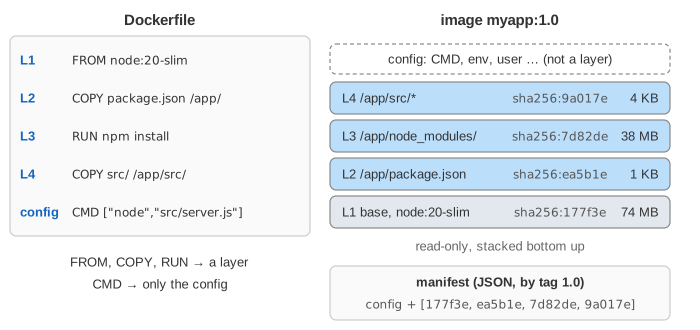
A Docker image is not one big file. It is a stack of layers. Each Dockerfile instruction that changes files (FROM, COPY, RUN) adds one layer: a tar archive of only the files that step added, changed or deleted. Every layer is named by the hash of its content, its digest (sha256:…). A small JSON manifest lists the image config and the layer digests in order. That is the whole image.
On the canvas: the Dockerfile and its build context on the left, the image's layer stack in the middle, a registry on the right, and two containers below. Start with docker build, or run a demo.
One layer per instruction, named by its content
| instruction | makes a layer? | what is in it |
|---|---|---|
FROM node:20-slim | uses the base image's layers | Debian files and Node.js (several layers in reality, one here) |
COPY / ADD | yes | the copied files |
RUN | yes | every file the command created, changed or deleted |
CMD, ENV, EXPOSE, LABEL, USER | no | only the image config (JSON) |
Because a layer is named by the hash of its bytes, the same layer is stored once on a host and once in a registry, however many images use it. A digest also proves the content: if one byte changes, the name changes. The page uses short made-up digests; real ones are 64 hex characters of SHA-256 over the compressed tar. docker history myapp:1.0 lists the layers with the instruction that made each one.
The build cache: hit, miss, and everything after a miss
Before running a step, BuildKit computes a cache key from the parent layer, the instruction text and, for COPY and ADD, a checksum of the copied files (their content and metadata, not their timestamps). If the cache already holds that key, the step is skipped and the old layer is reused: CACHED in the build output, 0 s (Demo 1). If not, the step runs and makes a new layer.
A new layer means a new parent for the next step, so its key is new too. After the first miss, every later step misses, even if its own instruction and files did not change. A RUN key does not look at the network either: RUN apt-get update stays cached for months unless something above it changes.
Why the order of the steps matters
So put the steps that rarely change first, and the files you edit all day last. The classic case is a Node.js app (the same holds for pip install -r requirements.txt, go mod download, mvn dependency:go-offline):
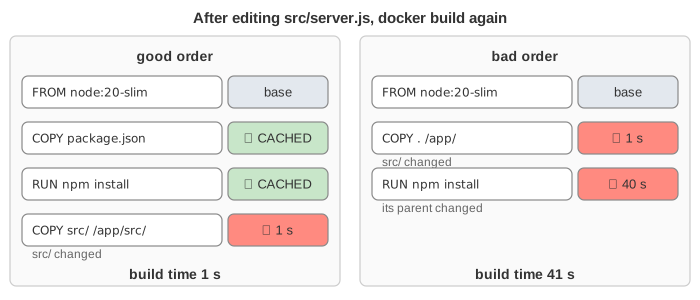
| after editing src/server.js | good order | bad order (COPY . first) |
|---|---|---|
| steps rebuilt | only COPY src/ | COPY . and RUN npm install |
| build time | 1 s | 41 s |
| new layers to push | 4 KB | 5 KB + 38 MB |
(Demo 2 and Demo 3.) Editing package.json does re-run npm install in both orders, as it should. In the good order the following COPY src/ also misses (its parent changed), but it copies the same files, so it gets the same digest as before and nothing new has to be pushed. A .dockerignore that leaves out node_modules, .git and logs keeps unrelated files from changing the checksum of COPY ..
Union mount: lowerdir, upperdir, merged
To run a container, Docker's overlay2 driver mounts an OverlayFS: the image layers as the read-only lowerdir (L4:L3:L2:L1, highest first), one new empty directory as the writable upperdir, and the merged directory, which becomes the container's /. A name in the merged view comes from the highest layer that has it. Nothing is copied when a container starts, so it starts in milliseconds and uses no extra disk.
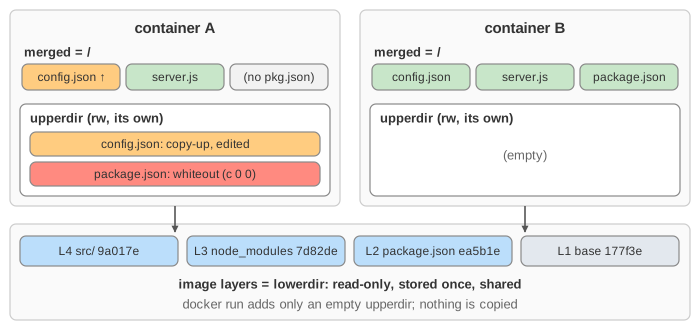
The container's thin writable layer is the upperdir:
- Copy-up on write. Writing to a file from a lower layer first copies the whole file into the upperdir, then changes the copy. The image layer never changes, so another container still sees the original. One byte changed in a 1 GB file costs a 1 GB copy, which is why databases keep their data in a volume.
- Whiteout on delete. Deleting a file from a lower layer can't remove it from that layer, so OverlayFS creates a whiteout (a character device with number 0/0 and the same name) in the upperdir. The merged view hides the name. A deleted directory that is created again gets an opaque marker instead.
- New files go straight into the upperdir.
(Demo 4.) docker diff lists exactly what is in a container's upperdir (C changed, A added, D deleted), and docker commit turns it into a new layer. docker rm deletes it.
Whiteouts also explain a common surprise: RUN rm -rf /var/lib/apt/lists/* in its own step does not make an image smaller, because the files are still in the layer below. Clean up in the same RUN that created the files, or use a multi-stage build and COPY --from=build only what the final image needs.
Push and pull: only the missing layers travel
A registry (Docker Hub, GHCR, ECR, Harbor) stores blobs by digest and manifests by tag, through the OCI Distribution API (Demo 5):
| step | request | answer |
|---|---|---|
| does the registry have this layer? | HEAD /v2/myapp/blobs/sha256:… | 200 (skip: "Layer already exists") or 404 |
| upload a missing layer | POST then PUT /v2/myapp/blobs/uploads/…?digest=sha256:… | 201 Created |
| publish the tag | PUT /v2/myapp/manifests/1.0 | 201 Created |
A pull is the same in reverse: GET the manifest for the tag, then GET only the blobs whose digests the host does not have yet. So a rebuild that changed only the top 4 KB layer is a 4 KB push and a 4 KB pull on every server, which is the payoff of a good layer order. Kubernetes nodes pull the same way when a pod starts (see how Kubernetes talks to containerd and Docker).
See also: What a Container Really Is shows the rest of docker run (runc, namespaces, cgroups, veth) with a short OverlayFS section; this page goes deeper into how the layers are built, cached, shared and shipped. How the kernel follows a path through a mount point is shown in What open() Does.
What the page leaves out
The base image's own several layers and multi-platform image indexes (linux/amd64, linux/arm64), compression (gzip, zstd) and the difference between the compressed digest and the uncompressed diff_id, the image config's rootfs.diff_ids and chain IDs, BuildKit's parallel stages, cache mounts (RUN --mount=type=cache), remote cache (--cache-from, --cache-to), cache eviction (docker builder prune), ADD with URLs, OverlayFS workdir, redirect_dir and metacopy, other storage drivers (btrfs, zfs, containerd snapshotters), lazy pulling (eStargz, SOCI), cross-repository blob mounts, and image signing.