The idea: a container is a process
A container is not a small virtual machine. It is an ordinary Linux process, started by the same kernel as every other process on the host, with three things wrapped around it. Namespaces change what it can see. cgroups limit what it can use. An OverlayFS mount gives it its own root file system, built from the image's layers. A veth pair connects it to a network bridge.
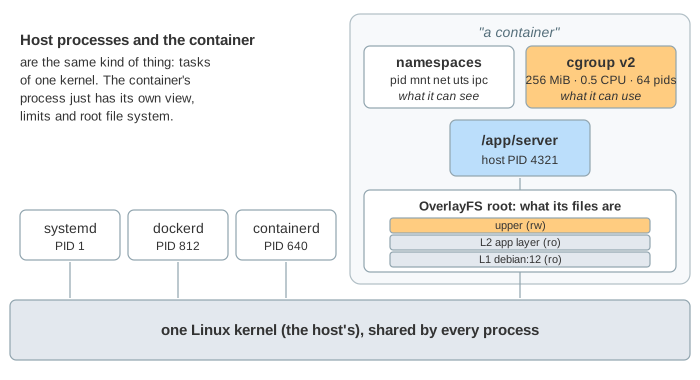
On the canvas: the host with the programs that start a container and its process list, the container's view of the namespaces, the kernel's cgroup limits, the overlay file system as a grid of layers, and the network path. Start with docker run, or run a demo.
From docker run to execve
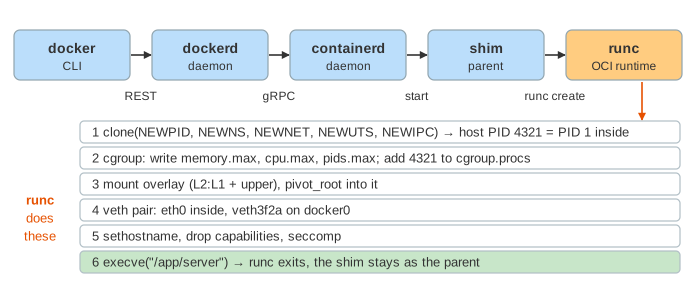
Several programs pass the request down (Demo 1: docker run, step by step):
| program | job |
|---|---|
docker CLI | a client: sends REST calls to dockerd over /var/run/docker.sock |
dockerd | images, networks, volumes; writes the OCI bundle (config.json) |
containerd | manages container lifecycles; also used directly by Kubernetes |
containerd-shim | the container's parent; keeps stdio and the exit code, so the daemons can restart |
runc | the OCI runtime: clone, cgroup, mounts, pivot_root, execve, then exits |
Namespaces: what the process sees
runc creates the namespaces with one clone() call (see system calls). Each namespace gives the process its own copy of one kind of global name:
| namespace | inside the container | on the host |
|---|---|---|
pid | the server is PID 1 | the server is PID 4321 |
mnt | / is the overlay | / is the host disk |
net | lo and eth0 172.17.0.2 | eth0 10.0.0.5, docker0, the veth ends |
uts | hostname a1b2c3d4e5f6 | hostname host-01 |
ipc | its own SysV and POSIX message queues, shared memory | the host's |
user | not used by default: root inside is root on the host | (rootless mode and userns-remap map root to an unprivileged uid) |
The host sees everything. ps -e on the host lists the server as 4321, and an admin can enter its namespaces with nsenter. PID 1 is special: when it dies, the kernel kills every other process in the namespace, and that is the container stopping.
Why root in a container with a user namespace still can't read a host file owned by root is on Linux Permissions: uid, rwx, setuid and Capabilities.
cgroups v2: what the process can use
Every container gets a directory under /sys/fs/cgroup. Writing a value into a file there sets a limit for every process in cgroup.procs and all their children.
| file | this page | what happens at the limit |
|---|---|---|
memory.max | 256 MiB (--memory 256m) | the kernel reclaims cache in the cgroup; if that is not enough, the OOM killer kills a process in it (Demo 2: exit code 137) |
cpu.max | 50000 100000 (--cpus 0.5) | after 50 ms in a 100 ms period the cgroup is throttled until the next period (Demo 3: 1 s of work takes 2 s) |
pids.max | 64 (--pids-limit 64) | fork() fails with EAGAIN (Demo 4) |
A memory limit kills; a CPU limit only slows down. Throttling shows up in cpu.stat as nr_throttled and throttled_usec, and is a common cause of slow tail latency in containers that look idle on average. Kubernetes turns a pod's resources.limits into exactly these files (see the pod lifecycle).
OverlayFS: layers, copy-up and whiteouts
An image is a stack of read-only layers, one per Dockerfile step that changed files. The container's root is an overlay mount: the image layers as lowerdir, one empty writable upperdir on top, and the merged view where each name comes from the highest layer that has it. Many containers can share the same lower layers.
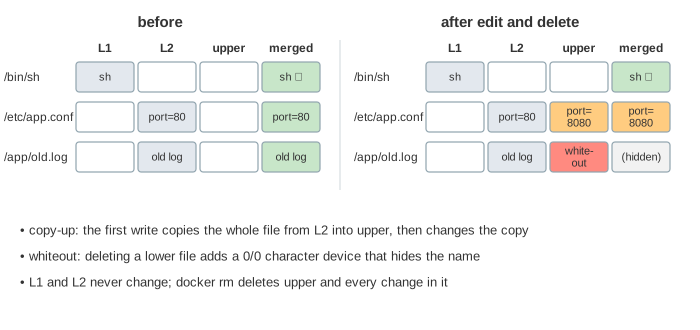
Writing to a file from a lower layer first copies the whole file up; deleting one creates a whiteout (a 0/0 character device) that hides it (Demo 5). So a big file edited once is copied in full, and deleting a file in a later Dockerfile step never makes the image smaller. docker rm deletes the upper directory, and every change with it (Demo 7): data that must survive belongs in a volume.
Networking: veth, bridge and NAT
The container's net namespace starts with only lo. Docker creates a veth pair, a virtual cable with two ends: one becomes eth0 inside, the other is plugged into the docker0 bridge on the host. Outgoing traffic is routed through the bridge and MASQUERADEd to the host's address; replies are translated back by conntrack (Demo 6; see NAT). Kubernetes pods use the same pieces through a CNI plugin (see Kubernetes networking).
The docker command itself talks to dockerd over the unix socket /var/run/docker.sock, guarded by its file permissions; see Unix Socket vs TCP on Loopback.
Containers vs virtual machines
| container | virtual machine | |
|---|---|---|
| kernel | the host's, shared | its own |
| start time | milliseconds: clone + exec (see program loading) | seconds: boot a kernel |
| isolation | namespaces, cgroups, capabilities, seccomp | hardware virtualization |
| a kernel bug | can affect every container on the host | stays inside the guest |
See also: Why an app running as PID 1 in a container piles up zombies, and how tini (docker run --init) fixes it, is on A Linux Process from fork() to Reaping. How memory.max ends in a memcg OOM kill, and how the host's own reclaim works, is shown in Linux Out of Memory. How the kernel follows a path across a mount point is shown in What open() Does.
See also: How a Dockerfile builds the image layers, how the build cache decides what to rebuild, and why a push sends only the missing layers is shown in How a Dockerfile Becomes Image Layers. How containers find each other by name, how -p publishes a port with DNAT, and the host and none modes are shown step by step in How Docker Networking Works on One Host.
The seccomp filter Docker puts on every container, and what it does to a blocked mount, is animated on seccomp and eBPF: Programs Inside the Kernel.
What the page leaves out
Capabilities and seccomp in detail, AppArmor and SELinux, user namespaces and rootless containers, the cgroup io controller, swap, memory reclaim and memory.high, cgroup v1, image pulling and content-addressed layer storage, volumes and bind mounts, port publishing (-p, DNAT), other runtimes (crun, gVisor, Kata Containers) and Kubernetes' CRI (see how Kubernetes talks to containerd and Docker).