The idea: cables, a switch and a few NAT rules
Docker networking on one host is built from ordinary Linux parts. Each container has its own network namespace: its own interfaces, routes, ARP cache and ports. A veth pair, a virtual cable, connects the container's eth0 to a Linux bridge (a software switch) in the host. For traffic that leaves the host, or comes in from outside, a few iptables rules rewrite the addresses, and conntrack remembers each rewrite so the replies can be undone.
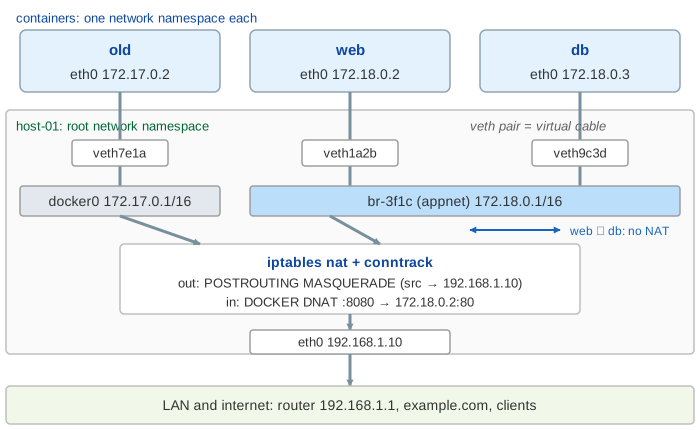
On the canvas: the containers at the top (each box is a namespace), the host below with the veth ends, the two bridges, Docker's DNS, the iptables rules and conntrack, then the host's eth0 and the outside world. Every packet is drawn hop by hop, replies too, and its label shows src → dst, so you can watch the addresses change. The setup is:
docker network create appnet                      # bridge br-3f1c, 172.18.0.0/16
docker run -d --name web --network appnet -p 8080:80 nginx
docker run -d --name db  --network appnet postgres
docker run -d --name old busybox sleep 1d          # default bridge docker0
docker run -d --name sandbox --network none busybox sleep 1d
docker run -d --name mon --network host prom/node-exporter
veth pairs and bridges
A new container's namespace has only lo. Docker creates a veth pair, moves one end into the namespace and renames it eth0, gives it an address from the network's subnet and a default route via the bridge's address. The other end (veth1a2b and so on) stays in the host and becomes a port of the bridge. Whatever goes into one end comes out of the other. ip link on the host shows the veth… ends; inside the container you only see eth0.
| network | bridge | subnet | name lookup |
|---|---|---|---|
default bridge | docker0 | 172.17.0.0/16 | no: a copy of the host's resolv.conf |
user-defined (docker network create) | br-<id> | 172.18.0.0/16, 172.19… | yes: embedded DNS at 127.0.0.11 |
Same bridge: ARP, then switching
When web pings db (Demo 1), 172.18.0.3 is on its own subnet, so no router is needed, only db's MAC address. web broadcasts an ARP request. The bridge learns that web's MAC is behind veth1a2b and floods the broadcast to its other ports; db answers. The bridge now knows both MACs in its forwarding table (bridge fdb), and the ping and its reply are just switched from port to port. No routing, no NAT, the IPs never change. Containers on docker0 never see this traffic: a bridge is its own layer-2 segment.
Names: the embedded DNS at 127.0.0.11
On a user-defined network, every container's /etc/resolv.conf says nameserver 127.0.0.11. That address is inside the container's own namespace: Docker adds iptables rules there that send port 53 to a socket opened by dockerd. dockerd answers with the container names (and --network-alias names) on the same network, and forwards every other name to the host's resolvers. On the canvas the DNS box sits in the host, because the answers come from dockerd.
The default bridge has none of this (Demo 4). Its containers get a copy of the host's resolv.conf, so db goes to the LAN's DNS server, which answers NXDOMAIN. The old fix was --link, which writes /etc/hosts entries; the modern fix is a user-defined network.
Going out: MASQUERADE and conntrack
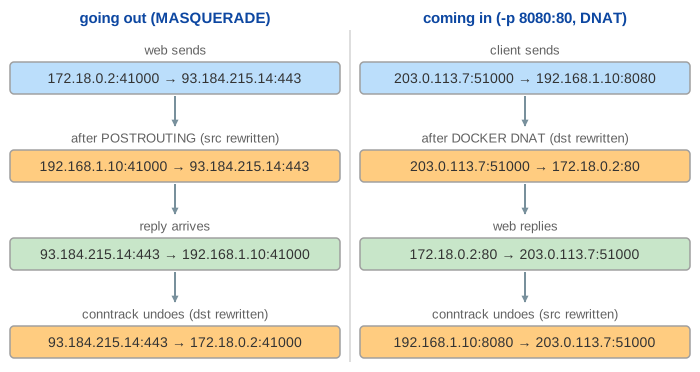
A packet to the internet (Demo 2) goes to the container's gateway, the bridge's address 172.18.0.1. The host routes it (Docker turns on net.ipv4.ip_forward) to eth0, and on the way out the nat POSTROUTING rule -s 172.18.0.0/16 ! -o br-3f1c -j MASQUERADE rewrites the source to the host's address. conntrack records the connection, and every reply is rewritten back to 172.18.0.2 without walking the rules again. This is the same source NAT a home router does (see NAT).
Published ports: DNAT in the DOCKER chain
-p 8080:80 does not open a socket in the host (Demo 3). It adds a rule to the nat DOCKER chain, which PREROUTING jumps to for packets addressed to the host: tcp port 8080 → DNAT to 172.18.0.2:80. Only the destination changes, so nginx sees the real client address. conntrack rewrites the reply's source back to 192.168.1.10:8080. Some details:
-p 8080:80listens on every host address;-p 127.0.0.1:8080:80only on loopback.- Published ports bypass most host firewalls (for example ufw rules in
INPUT), because the DNATed packet is forwarded, not delivered to the host. Filter them in theDOCKER-USERchain. - Connections from the host itself to
localhost:8080go throughdocker-proxy, a small userland proxy, or through anOUTPUTrule, depending on the settings.
Isolation between networks
Two Docker networks are two bridges and two subnets. The host could route between them, but Docker's filter rules (DOCKER-ISOLATION-STAGE-1 and -2 on older engines) drop anything that goes in on one Docker bridge and out on another (Demo 4, ping by IP). To let a container talk to another network, attach it: docker network connect appnet old gives old a second eth0-like interface on br-3f1c.
Host, none and overlay networks
| mode | namespace | what you get |
|---|---|---|
bridge (default) | own | veth pair to a bridge, NAT out, -p for in |
host | the host's | no veth, no NAT, fastest; ports are the host's ports, -p is ignored (Demo 5) |
none | own, only lo | no network at all; connect() fails with "Network is unreachable" (Demo 5) |
overlay (Swarm) | own | one subnet across several hosts: frames are wrapped in VXLAN (UDP 4789) between the hosts |
macvlan / ipvlan | own | the container gets an address on the LAN itself, no bridge and no NAT |
An overlay network is the same picture stretched across hosts: each host has a bridge for the overlay, and a VXLAN device carries frames for remote containers inside UDP packets between the host IPs. Kubernetes does the same with a CNI plugin (see The Life of an HTTP Request in Kubernetes).
See also: how docker run creates the namespaces, cgroups and the veth pair in the first place is on What a Container Really Is. How a home router rewrites addresses and ports is on NAT. The same veth, bridge and DNAT pieces, spread over a cluster with kube-proxy and VXLAN, are on The Life of an HTTP Request in Kubernetes.
What the page leaves out
IPv6, the DOCKER-USER chain in detail, nftables (newer engines can use it instead of iptables), docker-proxy and hairpin NAT, the exact chain names of each Docker version, --internal networks, custom subnets and IPAM, MTU, network aliases and service discovery in Swarm (VIPs, IPVS), multi-host overlay in practice, macvlan and ipvlan, and rootless Docker (slirp4netns or pasta instead of a bridge).