The idea: a stable name in front of changing pods
Pods come and go, and each new pod gets a new IP. So clients should not call pods directly. They call a
Service: a stable name, and usually a stable IP, in front of every pod that matches its
selector (here app: api). The field spec.type decides how traffic reaches
those pods and from where. There are five kinds. Three of them build on each other:
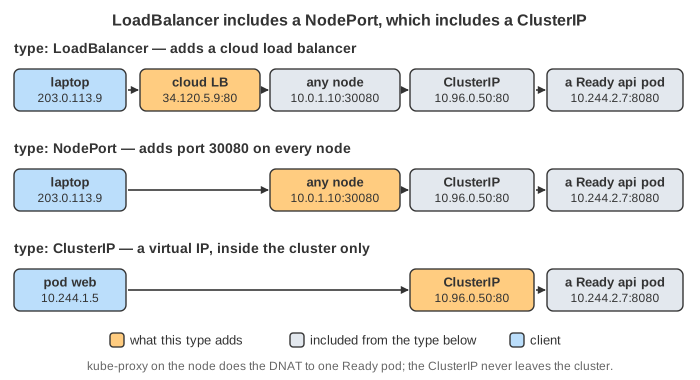
LoadBalancer includes a NodePort, and a NodePort includes a ClusterIP.
The canvas shows one cluster with two nodes, a client pod web and three pods of Deployment api.
At the top is the Service you apply (changed lines in orange) and what kubectl get svc shows. On the left is
the outside world: a laptop, the cloud load balancer (only for type LoadBalancer) and an outside database. Each node shows
the kube-proxy rules it holds for the Service. Each tab applies one type. Then DNS Lookup and
Send Request send traffic from the pod web or from the laptop, one hop per step.
Colours: purple = DNS, blue = request, green = reply, yellow = control plane, red = dropped.
ClusterIP: a virtual IP inside the cluster
This is the default type. The API server gives the Service an IP from the Service range, here 10.96.0.50.
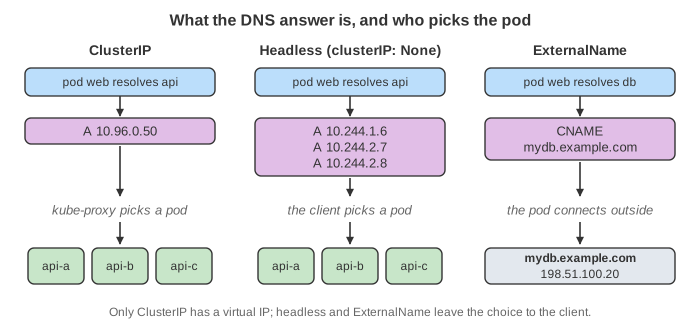
CoreDNS answers api.default.svc.cluster.local → 10.96.0.50. No network card has that IP. Instead,
kube-proxy on every node writes a nat rule. When a pod sends to 10.96.0.50:80, its own node
DNATs the packet to one Ready pod at :8080. On the way back, conntrack rewrites the source back to the ClusterIP.
The client never learns which pod answered (Demo: From a Pod).
Outside the cluster, 10.96.0.0/12 means nothing. No router knows the range, so a packet sent there from the laptop
never arrives (Demo: From Outside). Use ClusterIP for traffic between services inside the cluster.
NodePort: a port on every node
A NodePort Service is a ClusterIP Service with one more thing: a port from 30000–32767, here 30080.
It is opened on every node's own IP, even on a node that runs no api pod. A client outside sends to
<any node IP>:30080. That node DNATs the packet to a pod, which may be on another node. With the default
externalTrafficPolicy: Cluster it also SNATs the source to its own IP, so the reply comes back the same way.
The cost: the pod sees the node's IP, not the client's (Demo: NodePort). externalTrafficPolicy: Local keeps
the client IP but only uses pods on the node that got the packet.
NodePort alone is awkward for real users. They must know a node IP, the port is not 80 or 443, and if that node dies they must switch to another one.
LoadBalancer: NodePort plus a cloud load balancer
A LoadBalancer Service gets a ClusterIP and a NodePort too. In addition, the cloud-controller-manager watches
such Services and asks the cloud (AWS, GCP, Azure, …) for a load balancer. Its targets are every node's IP at the NodePort, and it
checks their health. When the cloud returns the address, the controller writes it into status.loadBalancer.
Until then kubectl get svc shows EXTERNAL-IP <pending>. On a cluster with no cloud controller
(bare metal, kind, minikube) it stays pending forever, unless something like MetalLB fills the role.
A request goes laptop → load balancer → a node's NodePort → kube-proxy → a pod. So it is balanced twice: the LB picks a node, and kube-proxy picks a pod (Demo: LoadBalancer). Some cloud LBs pass the packet on with the LB IP still as the destination, and kube-proxy has a rule for that IP too. Some LBs send straight to pod IPs. Each LoadBalancer Service costs one cloud load balancer, which is why many HTTP services share one through an Ingress instead.
ExternalName: only a DNS alias
An ExternalName Service has no selector, no endpoints, no ClusterIP and no kube-proxy rule. It is a CNAME
record in CoreDNS: db.default.svc.cluster.local → mydb.example.com. The pod resolves db, gets the outside
address, and connects there itself. The Service never carries a byte (Demo: ExternalName). It is handy for moving
a database into the cluster later: the apps keep calling db, and only the Service changes. One pitfall: HTTP and TLS clients
still send Host: db or SNI db, which the outside server may not accept.
Headless: DNS returns the pods themselves
With clusterIP: None the Service has a selector and endpoints but no virtual IP. CoreDNS answers one A record per
Ready pod. The client gets 10.244.1.6, 10.244.2.7, 10.244.2.8, picks one, and connects straight to it. Nothing is
rewritten, so balancing the load is now the client's job (Demo: Headless). That is what clients that keep long
connections need, such as gRPC with round-robin over all addresses or database drivers that must reach one specific replica.
StatefulSets use a headless Service to give each pod a stable DNS name, such as db-0.db.default.svc.cluster.local.
Side by side
| type | gets a virtual IP | DNS answer | reachable from | balanced by | typical use |
|---|---|---|---|---|---|
| ClusterIP | yes | A ClusterIP | inside only | kube-proxy | service-to-service |
| NodePort | yes + port 30000–32767 on every node | A ClusterIP | inside + node IPs | kube-proxy | dev clusters, behind your own LB |
| LoadBalancer | yes + NodePort + cloud LB IP | A ClusterIP | inside + internet | cloud LB, then kube-proxy | exposing a TCP/UDP service |
| ExternalName | no | CNAME outside host | (points outside) | none | alias for an outside database or API |
| Headless | no (None) | A pod IPs | inside only | the client | StatefulSets, gRPC, client-side balancing |
And Ingress or Gateway?
Ingress and Gateway API are not Service types. An Ingress controller is a proxy (for example nginx) running in pods. It is
usually exposed by one LoadBalancer Service. It reads the HTTP Host and path and forwards each request to a
ClusterIP Service. So one cloud LB can serve many HTTP services. The packet-level path of a ClusterIP, a NodePort and an
Ingress (veth, iptables chains, conntrack, VXLAN) is on
The Life of an HTTP Request in Kubernetes. See also The Life of a
Kubernetes Pod (readiness decides which pods are endpoints), DNS Resolution and
NAT.
What the page leaves out
The TCP handshake (one request and one reply stand for a connection), the iptables/IPVS/nftables chains and the tunnel between
nodes (see the networking page), sessionAffinity, internalTrafficPolicy, externalIPs,
loadBalancerSourceRanges, dual-stack IPv4/IPv6, Services without a selector whose EndpointSlices you write by hand,
and pods that are not Ready (they are simply left out of the endpoints). kube-proxy and the load balancer really pick at random
or by hash. The page picks in a fixed order so the demos repeat.