The idea: borrow an address for a while
A device that joins a network needs an IP address, a subnet mask, a default gateway and a DNS server before it can talk to anything. Typing these in by hand doesn't scale and leads to two devices with the same address. The Dynamic Host Configuration Protocol (DHCP) hands them out automatically. A DHCP server (on a home network, the router) owns a pool of addresses and lends one to each client for a limited time, a lease. It writes every loan into its lease table.
The page has one LAN, 192.168.1.0/24, a router that runs the server with a pool of three addresses
(.100–.102, small on purpose so it can run out), four clients and a printer whose address
was set by hand. The clock is in seconds and only moves when you press Advance Clock or when a client's
own timer fires; messages on the LAN take no time.
DORA: DISCOVER, OFFER, REQUEST, ACK
A client without an address can't send a normal IP packet to the server: it doesn't know the server's address
and has no source address of its own. So it uses broadcast: source 0.0.0.0:68,
destination 255.255.255.255:67, Ethernet destination ff:ff:ff:ff:ff:ff. Every device on the
LAN receives the frame; only a DHCP server listens on UDP port 67. DHCP runs over UDP because there is no address to
open a TCP connection from.
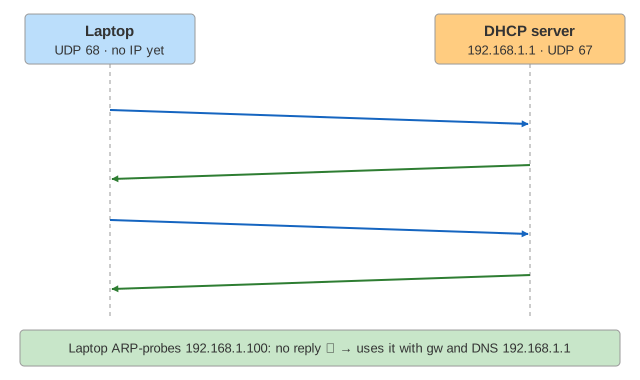
- DISCOVER: "is there a DHCP server?" with the client's MAC (
chaddr) and a random transaction idxid. - OFFER: the server picks an address (here: the client's previous one if it is free, otherwise
the lowest free one), reserves it and offers it in
yiaddr. - REQUEST: the client takes the offer. Still broadcast, with option 50 (the address) and option 54 (the server it chose), so that other servers that also made an offer withdraw it.
- ACK: the server records the lease and confirms it.
Because the client has no address yet, the server's replies are broadcast too (the client sets the
broadcast flag, 0x8000). Other clients receive them and drop them: the xid and
chaddr are not theirs. (Demo: Join a network)
What the ACK carries
The address is only part of the answer. The ACK carries the whole network configuration as numbered options:
| Option | Name | On this page |
|---|---|---|
| 53 | DHCP message type | DISCOVER, OFFER, REQUEST, ACK, NAK, DECLINE, RELEASE |
| 1 | Subnet mask | 255.255.255.0 |
| 3 | Router (default gateway) | 192.168.1.1 |
| 6 | DNS servers | 192.168.1.1 (the router forwards queries) |
| 51 | Lease time | 3600 s |
| 58 / 59 | Renewal (T1) / rebinding (T2) time | 1800 s / 3150 s |
| 50 | Requested IP address | in REQUEST and DECLINE |
| 54 | Server identifier | 192.168.1.1 |
| 55 | Parameter request list | the options the client wants |
The DNS server that resolves names for the laptop is the one DHCP told it about.
Leases, T1 and T2
A lease is a loan with an end date. A client that keeps running doesn't wait for the end:
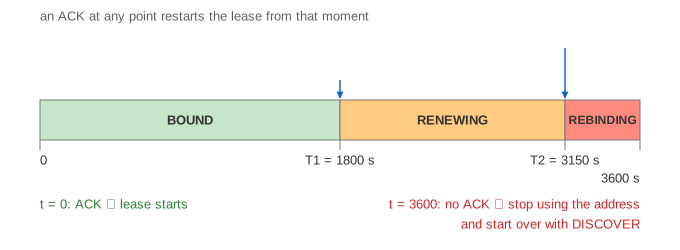
- At T1 (50 % of the lease) it renews: a REQUEST by unicast from its own address
to the server that gave the lease, with
ciaddrset. The ACK comes back by unicast and the lease starts again. The address never stops working. (Demo: Renew at T1) - If the server doesn't answer, the client retries, halving the time left each time (the page shows one retry).
- At T2 (87.5 %) it rebinds: the same REQUEST, now broadcast, so any server on the LAN that knows the network may extend it.
- At the end of the lease it must stop using the address at once, because the server may now give it to someone else, and start over with DISCOVER. (Demo: Server down)
Short leases (a café: 30 minutes) return addresses quickly when many guests come and go; long ones (an office: a day or more) mean less traffic and fewer surprises when the server is down for a while.
The client state machine
RFC 2131 describes the client as a state machine. The tag next to each client on the canvas shows its state:
| State | What the client is doing |
|---|---|
| INIT → SELECTING | sent DISCOVER, waiting for offers (retransmits after 4, 8, 16, 32 s) |
| REQUESTING | sent REQUEST for an offer, waiting for ACK |
| BOUND | using the address; timers T1, T2 and expiry are running |
| RENEWING | after T1: unicast REQUEST to its server |
| REBINDING | after T2: broadcast REQUEST to any server |
| INIT-REBOOT → REBOOTING | woke up remembering an address: REQUEST for it, no DISCOVER |
A laptop that wakes up from sleep asks straight away for the address it had (INIT-REBOOT). If the server still has that lease for this MAC, it ACKs, and joining takes two messages instead of four. (Demo: Wake up) Because the server remembers MACs, the same device usually gets the same address back even after its lease has expired. A RELEASE gives the address back early; nobody answers it.
Duplicate addresses: ARP probe and DECLINE
The server only knows about addresses it handed out. If someone configured a printer by hand with an address
inside the pool, the server will happily offer it again. So before using a new address the client sends an
ARP probe (RFC 5227): "who has 192.168.1.101?", with sender IP 0.0.0.0 so
that nobody updates its ARP cache. If anyone answers, the address is in use: the client sends a
DECLINE, the server marks the address as unusable for a while (dnsmasq: 10 minutes), and the
client waits at least 10 seconds before starting over. (Demo: Address in use)
How ARP maps an IP address to a MAC, and how gratuitous ARP announces an address, is shown on How ARP Finds a MAC Address.
NAK: "not on this network"
A laptop that last had 10.0.0.57 at the office asks for it at home (INIT-REBOOT). That address isn't
on the home subnet, so the server answers NAK. The client forgets the address and does a full
DORA. A NAK also comes when the requested address now belongs to another client. (Demo: Wrong network)
An empty pool
When every address is bound, offered or declined, the server has nothing to offer and simply stays silent. The client can't tell this from a dead server: it retransmits DISCOVER with back-off and, after a few tries, pauses (dhclient: 5 minutes). As soon as an address comes free (a RELEASE, or a lease that expires) the next retransmission gets it. (Demo: Pool exhausted) On a busy guest Wi-Fi this is why short leases matter.
Across subnets: relay agents
Broadcasts stop at the router, so in a company with many subnets either every subnet has its own server or the
router acts as a DHCP relay agent: it catches the broadcast, writes its own address on that subnet
into giaddr, and forwards the message by unicast to a central server. The server picks an address from
the pool that matches giaddr and answers through the relay. Option 82 can tell the server which switch
port the client is on.
Rogue DHCP servers
DHCP has no authentication: a client takes the first offer it gets. A rogue server (a misconfigured home router plugged into the office network, or an attacker) can hand out its own address as gateway and DNS and see all the traffic. Managed switches defend against this with DHCP snooping: only ports marked as trusted may send OFFER and ACK. The same table of bindings feeds dynamic ARP inspection.
See also How NAT Shares One Public Address (what the router does with the private addresses DHCP gave out), TCP vs UDP and How a DNS Name Is Resolved.
See also IPv4 vs IPv6, where IPv6 hosts build their own address with SLAAC instead of DHCP.
What the page leaves out
Relay agents on the canvas, several servers and failover, DHCPv6 and IPv6 SLAAC, the link-local
169.254.x.x address that Windows and macOS pick when no server answers, the random jitter in the
back-off (left out so demos repeat), more than one renewal retry, the server's own ping before an offer (ISC dhcpd,
dnsmasq), static reservations by MAC, the minimum lease, BOOTP history, and the 300-byte message layout (only the
fields that matter are shown).