The idea: three boxes, three layers
A hub, a switch and a router all have a row of ports and blinking lights, and they all move traffic between computers. The difference is how much of the frame each one reads. A hub reads nothing: it copies the electrical signal to every other port. A switch reads the destination MAC address and sends the frame out of one port. A router reads the destination IP address and sends the packet into another network. That is layer 1, layer 2 and layer 3 of the network stack.
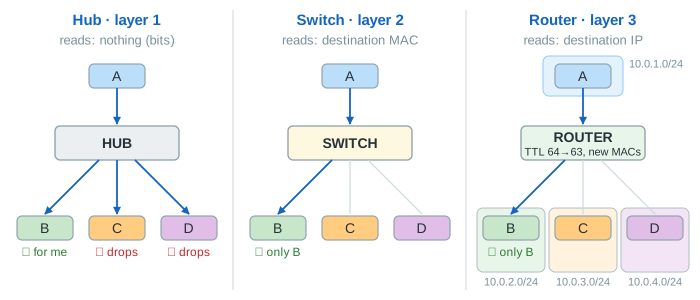
The canvas runs the same traffic through three small networks on one clock. Each has the same four hosts A, B, C and D with the same MAC addresses. One tick is one frame crossing one cable. Under each device you see what it keeps: nothing for the hub (only the state of its shared wire), a MAC address table for the switch, a routing table and an ARP cache for the router.
Hub: a repeater with many ports
A hub works at the physical layer. Bits that come in on one port go out of all the others, a few nanoseconds later. It has no MAC address, no table and no idea who is talking to whom. Every host gets every frame. Its network card compares the destination MAC with its own and quietly drops the frame if they differ. On the canvas this is the red ✗ not mine, drop under C and D (Demo: First ping). That is why one ping costs the hub network 4 unwanted copies.
Because all ports are really one wire, only one host can send at a time. Classic Ethernet handles this with CSMA/CD: listen before sending (carrier sense), and if two hosts start on the same tick, both notice the collision, send a short jam signal, wait a random number of slots (binary exponential backoff) and try again. A hub link is therefore half duplex. In Demo: Two conversations at once, A→B and C→D collide at t = 1, A waits 0 slots and C 1 slot, C then hears A's frame being repeated and waits again. Everything is delivered at t = 5, against t = 2 for the switch and the router.
Since every frame reaches every port, a laptop with Wireshark in promiscuous mode on a hub sees all the traffic of the network (Demo: A sniffer on C: 6 of 6 frames). Hubs have disappeared from shops for these reasons. The idea lives on in Wi-Fi, where the radio channel is a shared medium too.
Switch: learn, then forward or flood
A switch works at the data link layer. For every frame it receives, it writes
source MAC → port into its MAC address table (learning). Then it
looks up the destination MAC. If the MAC is known, the frame goes out of that one port. If it is
unknown, or it is a broadcast, the switch floods it out of every other port. The first
ping on the canvas is flooded once, because the switch has never heard from B. B's reply teaches it
where B is, and from then on nothing is flooded (Demo: Second ping: 0 unwanted copies).
Each switch port is a separate cable with its own pair of wires in each direction. So each port is
its own collision domain, the link is full duplex, and A→B and C→D
move at the same time. The hosts don't need to know the switch exists: it has no address in the frames.
But it is still one network: all four hosts share one IP subnet 10.0.0.0/24
and one broadcast domain. A broadcast from A reaches B, C and D, just as with the hub
(Demo: A broadcast). Aging, loops, Spanning Tree and VLANs are on
How Ethernet Switches Forward Frames.
Router: one network per port
A router works at the network layer. Each port is an interface in a
different IP network, with its own MAC (R0 to R3 on the canvas) and its own IP
(10.0.1.1 to 10.0.4.1). So in the router panel the hosts have different
addresses: A is 10.0.1.10/24, B is 10.0.2.11/24. A sees that B is not in its
own network and sends the packet to its default gateway 10.0.1.1. For
that it first needs the gateway's MAC, so the first packet starts with an
ARP request.
The router then looks up the destination IP in its routing table
(10.0.2.0/24 → g1), lowers the TTL from 64 to 63, asks ARP for B's MAC on
g1 if it doesn't have it, and sends the packet with new MAC addresses: source R1,
destination B. The IP addresses stay the same from end to end, but the MAC addresses change at every
hop. With empty caches the first ping takes 8 ticks (two ARP exchanges and four
packet hops). The second takes 4, the same as the switch. More on lookups, TTL and ICMP errors on
How a Router Forwards a Packet.
A router does not forward broadcasts. The DHCP DISCOVER from A stops at g0 and no other host hears it. That is the main reason networks are split by routers: every broadcast domain stays small. (A real network forwards DHCP with a DHCP relay, see How a Device Gets an IP Address.)
Collision domains and broadcast domains
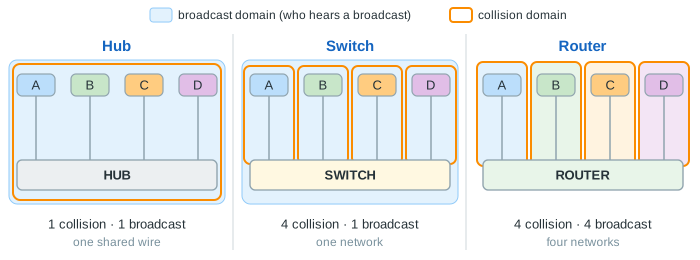
Two words sum up the difference. A collision domain is the set of hosts that share one
wire, where two senders at once collide. A broadcast domain is the set of hosts that
receive a broadcast (ff:ff:ff:ff:ff:ff): ARP requests, DHCP DISCOVER and the like.
Demo: Collision and broadcast domains shades them on the canvas.
| Device (4 ports) | Collision domains | Broadcast domains | IP networks |
|---|---|---|---|
| Hub | 1 | 1 | 1 |
| Switch | 4 | 1 | 1 |
| Router | 4 | 4 | 4 |
Side by side
| Hub | Switch | Router | |
|---|---|---|---|
| Layer | 1, physical | 2, data link | 3, network |
| Reads | nothing (bits) | destination MAC | destination IP |
| Keeps | nothing | MAC table (MAC → port) | routing table, ARP cache |
| Unicast goes to | every other port | one port (after learning) | one port, into another network |
| Broadcast | every port | every port | dropped |
| Duplex | half, collisions | full | full |
| Changes the frame | no | no | new MACs, TTL − 1, new checksum |
| A sniffer sees | everything | only flooded frames | only its own network |
| Demo 1 (ticks · unwanted copies) | 4 · 4 | 4 · 2 | 8 · 0 |
The box called a "router" at home is several of these at once: a router with NAT between your network and the internet, a small switch for the LAN ports, and a Wi-Fi access point. Packets from your laptop to your printer only cross its switch part. For the whole stack in one picture, see Internet Protocol Layers.
See also: how one switch is split into several broadcast domains, and how a router joins them again, in VLANs: One Switch, Several Networks.
See also: Wi-Fi cannot detect collisions while sending, so it avoids them with backoff and ACKs instead of CSMA/CD, in Wi-Fi CSMA/CA.
What the page leaves out
- Real timing: preamble, frame sizes, the 512-bit slot time and the 16-attempt limit of CSMA/CD.
- MAC table aging, loops and Spanning Tree, VLANs (on the switch page).
- Layer 3 switches, which route between VLANs in hardware, and bridges, the two-port ancestors of switches.
- Routing protocols (OSPF, BGP), longest prefix match with overlapping routes, ICMP errors.
- ARP in the hub and switch networks: the hosts there already know each other's MAC, so only the router network shows it.
- Wi-Fi, which shares one radio channel like a hub and uses CSMA/CA instead of CSMA/CD.