The idea: one switch, several networks
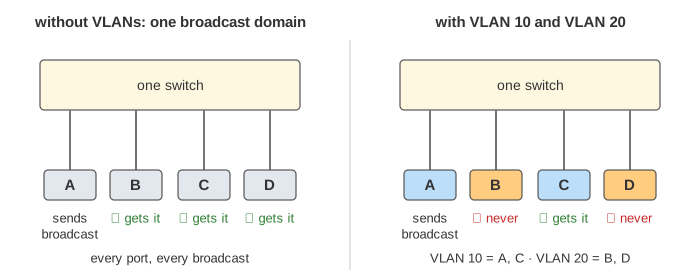
A switch floods every broadcast to all of its ports, so everything plugged into it is one broadcast domain. A VLAN (virtual LAN) cuts one physical switch into several logical ones. Each port is put in a VLAN, and the switch only ever moves a frame between ports of the same VLAN. Hosts in different VLANs might as well be on different switches.
The canvas has two switches. A and C are in VLAN 10 (blue, subnet 10.0.10.0/24), B and D in VLAN 20 (orange, 10.0.20.0/24). SW1 and SW2 are joined by a trunk, and router R1 hangs off SW1 on another trunk. On the right are the two MAC tables and R1's routing table; the band under the network shows every header field of the frame on the wire right now. In Demo 1 A's broadcast reaches C and R1, while B and D, on the very same switches, never see it.
Access ports and trunk ports
An access port belongs to exactly one VLAN and connects an ordinary host. The host sends and receives plain Ethernet frames: it has no idea VLANs exist. The switch remembers which VLAN each frame came from by the port it came in on.
A trunk port carries many VLANs on one cable, usually between switches or to a router. Because the frames of all VLANs share the cable, each one must say which VLAN it belongs to. That is what the 802.1Q tag is for. A trunk can be limited to some VLANs with an allowed list.
| Access port | Trunk port | |
|---|---|---|
| VLANs | one | many (the allowed list) |
| Frames on the cable | untagged | 802.1Q tagged |
| Connects | a host | a switch, a router, a hypervisor |
| Cisco config | switchport mode accessswitchport access vlan 10 | switchport mode trunkswitchport trunk allowed vlan 10,20 |
The MAC table is kept per VLAN: the key is (VLAN, MAC), not just the MAC. R1 appears twice in each table, once in VLAN 10 and once in VLAN 20, with the same MAC and the same port.
The 802.1Q tag
The 802.1Q tag is 4 bytes inserted between the source MAC and the EtherType. It starts with the TPID 0x8100, which tells the receiver "a tag follows", then 3 bits of priority (PCP), 1 bit DEI and the 12-bit VLAN ID (VID). 12 bits allow IDs 1 to 4094 (0 and 4095 are reserved). The frame grows from at most 1518 to 1522 bytes, and the switch must recompute the frame check sequence.
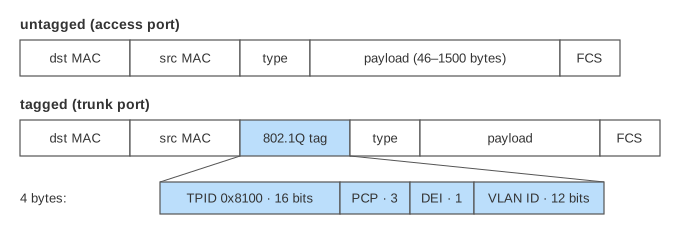
Watch the tag field in the frame band during Demo 2: A's ping to C leaves A untagged, gets
VLAN ID 10 on the SW1–SW2 trunk, and loses it again on SW2's access port to C. No router is involved,
because A and C are in the same VLAN and subnet.
Talking between VLANs: router-on-a-stick
Each VLAN is its own IP subnet, so a host in VLAN 10 that wants to reach VLAN 20 sends the packet to its default gateway, a router. With router-on-a-stick the router needs only one physical port: it is a trunk, split into one subinterface per VLAN.
interface g0/0.10
 encapsulation dot1Q 10
 ip address 10.0.10.1 255.255.255.0
interface g0/0.20
 encapsulation dot1Q 20
 ip address 10.0.20.1 255.255.255.0
A frame tagged 10 arrives on g0/0.10. R1 looks up the destination IP, finds it connected on
g0/0.20, lowers the TTL, rewrites both MAC addresses and sends the frame back down the same cable,
now tagged 20 (Demo 3). In Demo 4 the packet then also crosses the SW1–SW2 trunk tagged 20 to reach D.
See How a Router Forwards a Packet for the routing step itself.
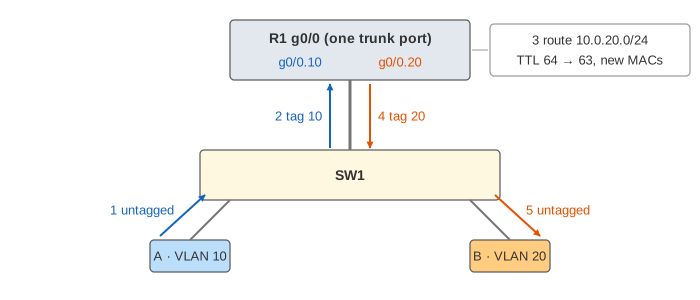
The hairpin is the weakness: all traffic between VLANs crosses the one trunk twice, so it caps the bandwidth. Larger networks route inside a layer-3 switch instead, with one virtual interface (SVI) per VLAN; the logic is the same, just without the cable.
When it breaks
| Mistake | What happens | Demo |
|---|---|---|
| no router (or no gateway) | hosts in different VLANs cannot reach each other at all; the ARP for the gateway gets no answer | 5 |
| VLAN missing from the trunk's allowed list | that VLAN is cut in two at the trunk, while other VLANs still work | 6 |
| access port in the wrong VLAN | the host is in the wrong broadcast domain; its address does not match the subnet, so nothing works | – |
| native VLAN mismatch on a trunk | untagged frames land in different VLANs at each end | – |
In Demo 5 A asks "who has 10.0.10.1?" and only C hears it. In Demo 6 B's ping to D is flooded only to R1 (which discards it, the MAC is not its own), because p8 no longer carries VLAN 20; A's ping to C on VLAN 10 still goes through.
Why use VLANs
- Smaller broadcast domains: ARP, DHCP and other broadcasts stay inside one VLAN.
- Separation: guests, phones, servers and cameras share the hardware but not the network, and the router or firewall between them decides what may cross.
- Flexibility: moving a host to another network is a config change, not a new cable.
See also How Ethernet Switches Forward Frames for MAC learning, flooding and Spanning Tree, Hub vs Switch vs Router for collision and broadcast domains, and How ARP Finds a MAC Address for the requests and replies this page treats as already done.
What the page leaves out
- MAC learning and aging: the tables and ARP caches start full here (see the Ethernet switch page).
- The native VLAN (untagged frames on a trunk), VLAN hopping attacks and why the native VLAN should be unused.
- DTP (automatic trunk negotiation), VTP, and per-VLAN Spanning Tree.
- Layer-3 switches with SVIs, QinQ (802.1ad, a tag inside a tag) and VXLAN for more than 4094 segments.
- The ARP and echo replies, which travel the same path back.