The idea: from IP address to MAC address
An IP address says which host a packet is for. But on an Ethernet or Wi-Fi link, a frame is delivered by
MAC address, the 48-bit address of a network card. Before the laptop 192.168.1.10 can send
anything to the printer 192.168.1.20, it must find out which MAC address the printer has. The
Address Resolution Protocol (ARP) asks the whole LAN and remembers the answer in an
ARP cache.
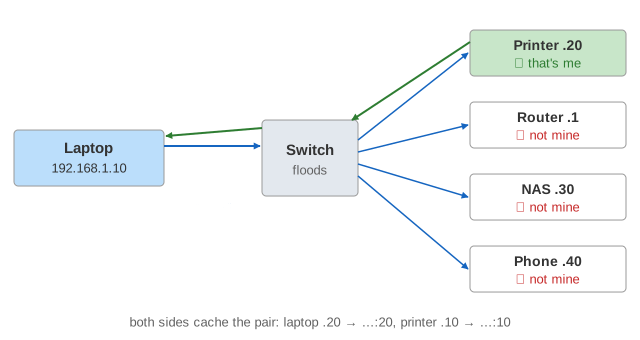
The page has one LAN, 192.168.1.0/24, with a 5-port switch. The laptop is on port 1, and its ARP cache
is shown in full. The router (the default gateway), a printer, a NAS and a phone are on ports 2–5, each with a small
cache. The clock is in seconds; frames take no time, ARP retries are 1 s apart.
Request and reply
An ARP request is sent to the broadcast MAC ff:ff:ff:ff:ff:ff with EtherType
0x0806. It carries four addresses: the sender's MAC and IP, and the target's IP with a target MAC of all
zeros (unknown). Every host on the LAN receives it. Hosts that don't own the target IP drop it. The owner caches the
sender's pair (it will need it to answer) and sends an ARP reply by unicast to the asker. Then the
laptop sends its packet, and the printer replies without an ARP of its own. (Demo: First ping)
| Field | Request | Reply |
|---|---|---|
| Ethernet dst | ff:ff:ff:ff:ff:ff | aa:00:00:00:00:10 (the asker) |
| op | 1 (request) | 2 (reply) |
| sender MAC / IP | aa:00:00:00:00:10 / 192.168.1.10 | aa:00:00:00:00:20 / 192.168.1.20 |
| target MAC / IP | 00:00:00:00:00:00 / 192.168.1.20 | aa:00:00:00:00:10 / 192.168.1.10 |
ARP only for the next hop
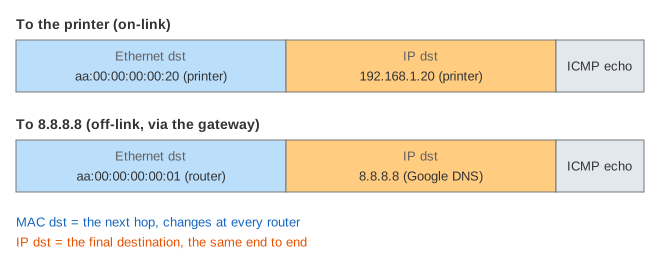
ARP works only inside one link. To reach 8.8.8.8, the laptop looks at its routing table: the address is
not in 192.168.1.0/24, so the packet goes to the default gateway 192.168.1.1.
The laptop ARPs for the router, and the frame carries the router's MAC while the IP header still says
8.8.8.8. The router repeats the same trick on its next link. (Demo: Off the LAN)
How the router picks its own next hop and rewrites the MAC addresses is on How a Router Forwards a Packet.
The cache and its states
Asking for every packet would flood the LAN, so answers are cached. Linux keeps a neighbour table
(ip neigh show) whose entries move through these states:
| State | Meaning | Next |
|---|---|---|
| INCOMPLETE | request sent, no answer; packets wait in a queue | reply → REACHABLE; 3 requests 1 s apart unanswered → FAILED |
| REACHABLE | confirmed recently | after base_reachable_time (30 s here; Linux: random 15–45 s) → STALE |
| STALE | maybe out of date, still used | a packet is sent → DELAY |
| DELAY | used; waiting for e.g. TCP to confirm | after delay_first_probe_time 5 s → PROBE |
| PROBE | unicast requests to the cached MAC | reply → REACHABLE; 3 unanswered → FAILED |
| FAILED | nobody answered | the next packet starts over |
A STALE entry isn't thrown away: the packet goes out at once on the old MAC, and the check happens afterwards, by unicast, so the rest of the LAN isn't bothered. (Demo: Entry ages) Windows and macOS keep simpler caches with a fixed lifetime, but the idea is the same.
What the switch does
The switch knows nothing about IP or ARP. It keeps a MAC table: for every frame it reads the source MAC and remembers which port it came from (aging out after 300 s). A frame for the broadcast address, or for a MAC not in the table, is flooded out of every other port; a frame for a known MAC goes out of one port only. That is why the ARP request reaches everyone but the reply and the ping reach only one host.
When nobody answers
If no host owns the address, the laptop sends 3 broadcasts 1 s apart (mcast_solicit,
retrans_time_ms), then marks the entry FAILED, drops the queued packets and reports
"Destination Host Unreachable". That message comes from the laptop itself, not from the network.
(Demo: Nobody answers)
Gratuitous ARP
A host can announce its own pair without being asked: a gratuitous ARP with sender IP = target IP, sent to everyone. Hosts that already cache that IP update the MAC. It is used when an address moves to another network card or machine (failover, a virtual IP, a VM that migrated), and to detect address conflicts. The DHCP page shows the related ARP probe a client sends before it uses a new address. (Demo: Gratuitous ARP)
ARP spoofing
ARP has no authentication: a host believes any reply. An attacker on the LAN can send forged replies saying
"192.168.1.1 is at my MAC". The victim's cache is poisoned, and its Internet
traffic goes to the attacker, who can read or change it and pass it on to the real router (a man in the middle).
(Demo: ARP spoofing) Defences:
- Dynamic ARP Inspection on managed switches drops ARP replies that don't match the DHCP snooping table (which IP was given to which MAC on which port).
- Static ARP entries for the gateway on important hosts.
- Encryption (TLS, VPN) so that intercepted traffic is useless.
IPv6: Neighbor Discovery
IPv6 has no ARP. Neighbor Discovery (RFC 4861) does the same job with ICMPv6 Neighbor Solicitation and Neighbor Advertisement messages, sent to a multicast group instead of broadcast. The Linux states above come from that RFC and are used for IPv4 too.
See also Internet Protocol Layers (ARP as one step of a packet's trip down the stack), How a Router Forwards a Packet and How a Device Gets an IP Address (DHCP).
What the page leaves out
Random REACHABLE times, garbage collection of old entries (gc_stale_time, gc_thresh), proxy
ARP, VLANs, Wi-Fi access points (which bridge like a switch), switch MAC-table overflow attacks, ARP for the router's
other interfaces, the router's own cache aging, arp_announce / arp_ignore, IPv6 Neighbor
Discovery on the canvas, and the minimum Ethernet frame padding (an ARP frame is padded from 42 to 60 bytes).